
Card Master 1.7 is live: 7-day free trial for new users · iPhone Duo ready

Your connections
belong to you,
not the company.

Stop uploading hard-earned business relationships into corporate CRMs where you are monitored or wiped clean when you change jobs. Card Master uses Apple on-device recognition and AI, with no developer-hosted card database. Your cards stay local by default, with optional encrypted backups to your personal iCloud.

The lifetime upgrade includes: Relationship Map and encrypted personal iCloud backups for existing lifetime users, plus free in-app calendar editing. AI suggestions require a supported Apple Intelligence device; manual organization remains available.

Local storage by default
Apple On-Device Recognition
Face ID Biometric Vault
Card Master
32 Cards · 8 Starred
🔍 Search name, company, phone, title...
Olivia Carter
Northstar Studio · Brand Director
📅 Visit Next Tue
📱 +1 (415) 555-0198 · San Francisco, CA 🏷️ Design Lead, Partner
Marcus Vance (VIP)
Apex Capital · Managing Partner
🔒 Face ID Vault
💼 Lead Investor · Protected by AES-GCM Hardware Encryption 🛡️ Never appears in general search or caches
Sophia Bennett
Daylight Labs · Product Manager
⭐ Starred
☎️ +1 (212) 555-0142 · Tech Expo 2026

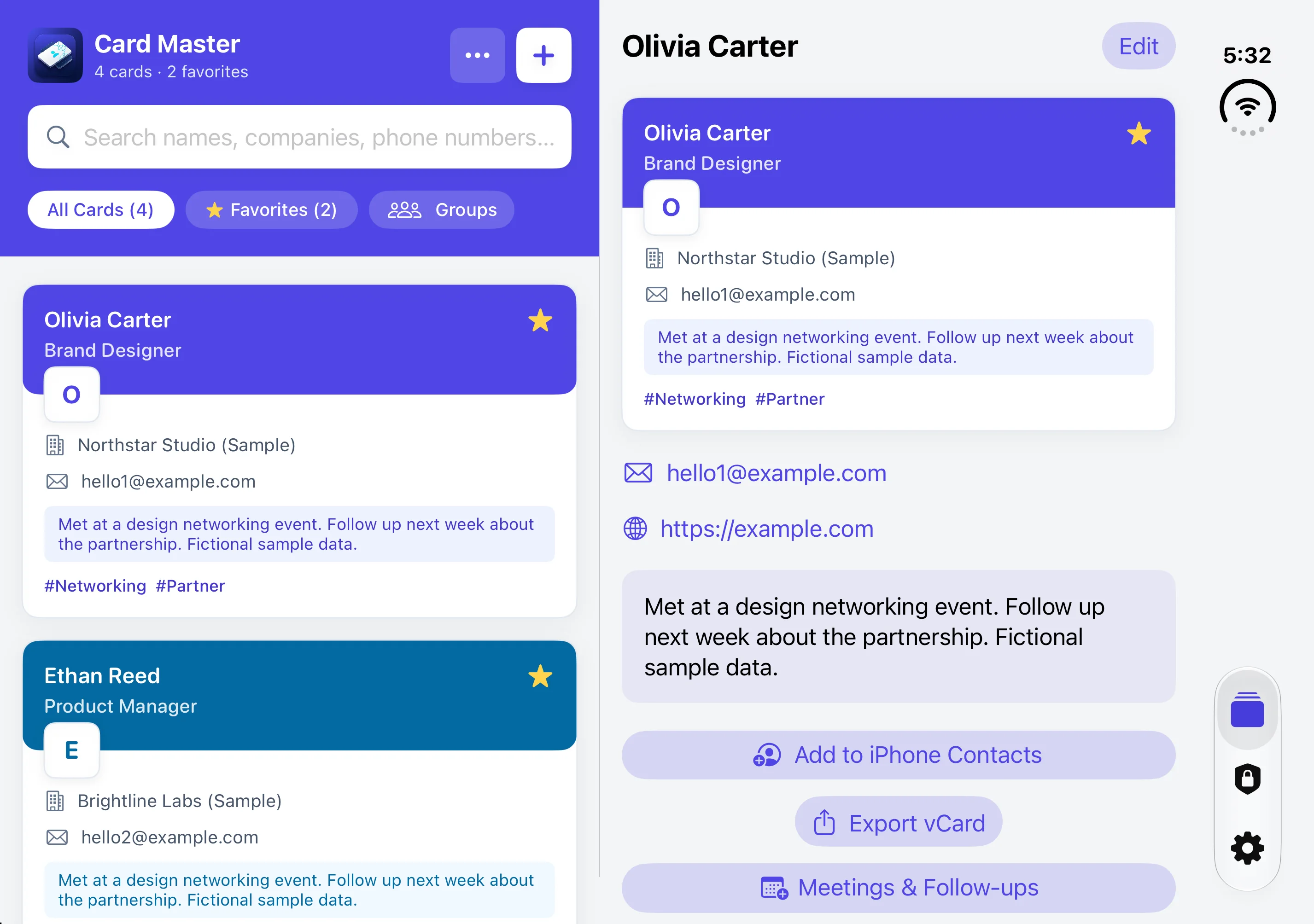
Your network, side by side on iPhone Duo

Version 1.6 adapts to the space on iPhone Duo. Open the inner display to browse your card list and the selected card in equal-width panes. Fold the device and continue where you left off.

Card Master on the iPhone Duo inner display with equal-width card list and detail panes
Actual iPhone Duo simulator capture with fictional sample cards.
  • List and details together

    Search, filter, and select cards on the left while contact details and follow-ups stay visible on the right.

  • Continue after folding

    Your selected card and unsaved editing draft remain in place when you fold or unfold.

  • Native vertical tabs

    Move between Cards, Private Cards, and Settings with the system tab sidebar on the inner display.

Try it free for 7 days. Snap a card, and it’s saved.

New users who download from 1.7 on can start a 7-day free trial when they add their first card. During the trial you can add cards, and ads are shown. When it ends, every saved card can still be viewed, edited, searched, exported and backed up. To keep adding cards, a one-time purchase unlocks it for life, removes ads and turns on business features. It is not a subscription and there is no automatic charge. If you downloaded before 1.7, nothing changes: you can keep adding cards for free. You can also start the trial or check its status in Settings.

New in 1.5: extensions and optional card backs

Add a country/region hint to each card, and keep departments and name readings. Add phone extensions and dialing delays: one comma pauses for 2 seconds, two for 4 seconds, with pauses preserved in Contacts and vCard. Capturing the back is entirely optional: save the front alone or add the back later. Recognize second-language text and product details on-device, then review and confirm products/services for search. The lifetime Relationship Map can show shared confirmed products; shared attributes do not mean two people know each other.

Requires iOS 17 or later. Apple Vision OCR does not require Apple Intelligence. Optional industry suggestions require a supported iOS 26+ device, supported language and an available Apple Intelligence on-device model. Manual organization remains available. No external or cloud AI is used. Ads, purchases and user-initiated encrypted personal iCloud backups require a connection.

Why Never Hand Your Network to Cloud CRMs

Your network is your personal competitive advantage. See the stark difference between corporate tools and Card Master:

Evaluation Metric Corporate CRMs / Cloud Card Apps Card Master (RenMaiMaster)
Data Ownership ✕ Owned by company servers; confiscated immediately when you depart ✓ 100% Owned by You; contacts stay in your phone across careers
Cloud Leak Risk ✕ Uploaded to third-party databases; vulnerable to hacks and employee scraping ✓ No developer-hosted card database; recognition stays on-device; you control backup and export
AI & Privacy Exploitation ✕ Cards sent to external cloud AI APIs for analysis and model training ✓ Apple Silicon Neural Engine runs locally; zero third-party AI
VIP Client Isolation ✕ All contacts mixed in one shared dashboard; visible to IT administrators ✓ Face ID / Touch ID Private Vault with AES-GCM encryption
Accounts & Tracking ✕ Mandatory phone/email registration and cross-app tracking cookies ✓ No Account, No Sign-up; works immediately out of the box
Pricing Model ✕ Expensive $10~$30/mo subscription; lose access if you stop paying ✓ Free Core Features; US$5.00 one-time buy for lifetime ad-free

Engineered for Sovereign Business Networking

Return to the true purpose of business card management: fast, accurate, secure, and converting connections into real opportunities.

Apple Silicon On-Device OCR

Accurately recognizes English and Traditional Chinese in milliseconds directly via Apple's on-device neural framework. No external AI service is used.

Face ID Private Vault

Lock sensitive relationships and high-profile clients in an isolated biometric vault. Encrypted using CryptoKit AES-GCM; invisible to general search and caches until unlocked.

Meeting Logs & Recurring Follow-ups

Record where and when you met, and schedule recurring visits. Free in-app native Calendar editing with automated 1-week advance reminders.

Smart Perspective Correction

Capture angled business cards on tables or desks. Automatic quadrilateral edge detection straightens photos into crisp rectangular documents, preserving uncropped originals.

Complete Data Sovereignty

Export and import standard vCard 3.0, Excel-compatible CSV, or sync with iOS Contacts. Includes full portable AES-GCM backups with a 256-bit Recovery Code for phone migration.

Personal Card Instant QR

Create your own business card and show an instant high-resolution vCard QR code. Networking partners can scan directly with their native camera app—no install required.

Honest Pricing. Zero Subscriptions.

We believe a business card manager should be a reliable utility you own forever, not an endless monthly billing trap.

Free Edition
Full core features unlocked, perfect for individual use
$0 / Free download
  • Apple on-device neural recognition
  • Free 7-day trial for adding cards (earlier downloads keep adding for free)
  • Face ID / Touch ID Private Vault
  • vCard / CSV / Contacts export & import
  • Free local encrypted backups and calendar editing; includes ads
Download Free

Common Questions

Clear answers about privacy, device migration, and ownership.

Without cloud servers, how do I transfer my cards when I buy a new iPhone?
Card Master includes an offline Portable Encrypted Backup feature. In Settings, you can export a secure AES-GCM encrypted backup file alongside a unique 256-bit Recovery Code. When you switch to a new iPhone, simply install Card Master, enter your Recovery Code, and all your cards (including photos and private cards) are restored in seconds—with a local backup or optional paid iCloud backup.
Can my employer, IT administrator, or CRM team see my saved cards?
Never. Card Master runs strictly inside your personal iPhone's iOS sandbox. There are no corporate admin portals, no team-sharing sync backends, and no surveillance mechanisms. Whether you change roles or companies, your contact roster remains your private, personal asset.
Does text recognition work offline or in airplane mode?
Yes, 100%. Card Master leverages Apple's native Vision framework and Neural Engine on your device. It requires zero network connectivity. You can take photos, scan cards, edit, and search seamlessly even in crowded convention centers or during flights.
Is the $5.00 ad-removal truly a one-time purchase?
Yes. We utilize standard App Store Non-Consumable In-App Purchases. Pay once (US$5.00 in the US; local prices are shown in the app), and ads are gone permanently. Existing lifetime purchases remain valid with no additional payment. You can restore your purchase on any new iPhone tied to your Apple account at any time without paying monthly or annual subscription fees.
Why don't you use OpenAI, ChatGPT, or cloud AI for scanning?
Sending business cards to external AI APIs exposes sensitive client phone numbers, private emails, and executive notes to third-party databases and training pipelines. We choose Apple on-device silicon specifically to ensure zero data leakage.

Take control of your professional network today.

Local-first storage, complete personal privacy, lifelong ownership. Download Card Master now.

Other apps we build
eSIMManager

eSIMManager

📱 Version 2.3 officially supports iPhone Duo

Card Master keeps your network. eSIMManager keeps your trips organized.

Not tied to any single eSIM brand — compare plans across platforms, then use eSIMManager to keep every card, activation, and expiration date organized in one place.

  • Batch eSIM import
  • Pre-departure setup guide
  • On-device usage estimate

iPhone · See the official site for supported languages and availability. Free to use with ads and an optional one-time purchase to remove them permanently; actual settings, installation, and usage still depend on official iOS and carrier information.


Visit Website ↗
MenuLens

MenuLens

Translate what you see. Convert the price.

Photograph products and shelf prices, convert the amount, and view Google shopping results inside the app. Menu translation is included. Shopping comparison is experimental.

iPhone · Available on the App Store · 10 free scans with a one-time lifetime unlock.

Visit Website ↗
Gaboon Viper

Gaboon Viper

📱 Version 2.0.6 officially supports iPhone Duo

Eat big. Regret slowly.

A pixel handheld-style action game where food digests over time, stomach capacity matters, and every bite is a risk.

iPhone · Available on the App Store · Free, no ads, no in-app purchases.

Visit Website ↗
Wild Showdown

Wild Showdown

📱 Version 1.1 officially supports iPhone Duo

A tipsy sheriff. One saloon. Hold the line.

A saloon shoot-out in the style of 1980s LCD handheld games: smash the bartender's plates and bottles, dodge flying apples, douse the dynamite with whiskey, then face the desperado.

  • LCD handheld feel
  • 10 levels × 3 modes
  • Game Center leaderboard

1.1 out now · Optimized for iPhone Duo: folded, unfolded and partially folded · Free, no ads, no in-app purchases.

Visit Website ↗

Your data, your choice

Available in the current 1.7 release: In-app Apple calendar editing, event linking and follow-up planning are free. The existing lifetime upgrade includes Relationship Map and encrypted personal iCloud backup/restore at no additional purchase. Local encrypted backups remain free. iCloud backup is initiated by you, requires an Apple account, iCloud Drive and storage, and is not live sync. Only encrypted files are uploaded; recovery codes are not. Keep your recovery code separately; support cannot recover it. Delete backups in Files > iCloud Drive > 人脈大師 > EncryptedBackups, then remove them from Recently Deleted for permanent removal. Deleting a backup does not delete local cards; deleting the app does not delete cloud backups. Shared attributes in Relationship Map do not establish that people know each other. Optional Apple Intelligence industry suggestions process company and job title on-device and require your confirmation. Full calendar access is requested on demand to retrieve/edit user-linked events; events follow your calendar account sync settings. Reminders is not accessed.