iOS 1.8 ya disponible · Importación por lotes, organización de viajes y configuración por etapas

Elige tu eSIM libremente. Gestiona cada viaje con tranquilidad.

Sin depender de una sola marca de eSIM. Compara planes según tu presupuesto e itinerario y usa eSIMManager para organizar tarjetas, datos de activación y fechas de validez. Los ajustes, la instalación y el uso real dependen de iOS y del proveedor.
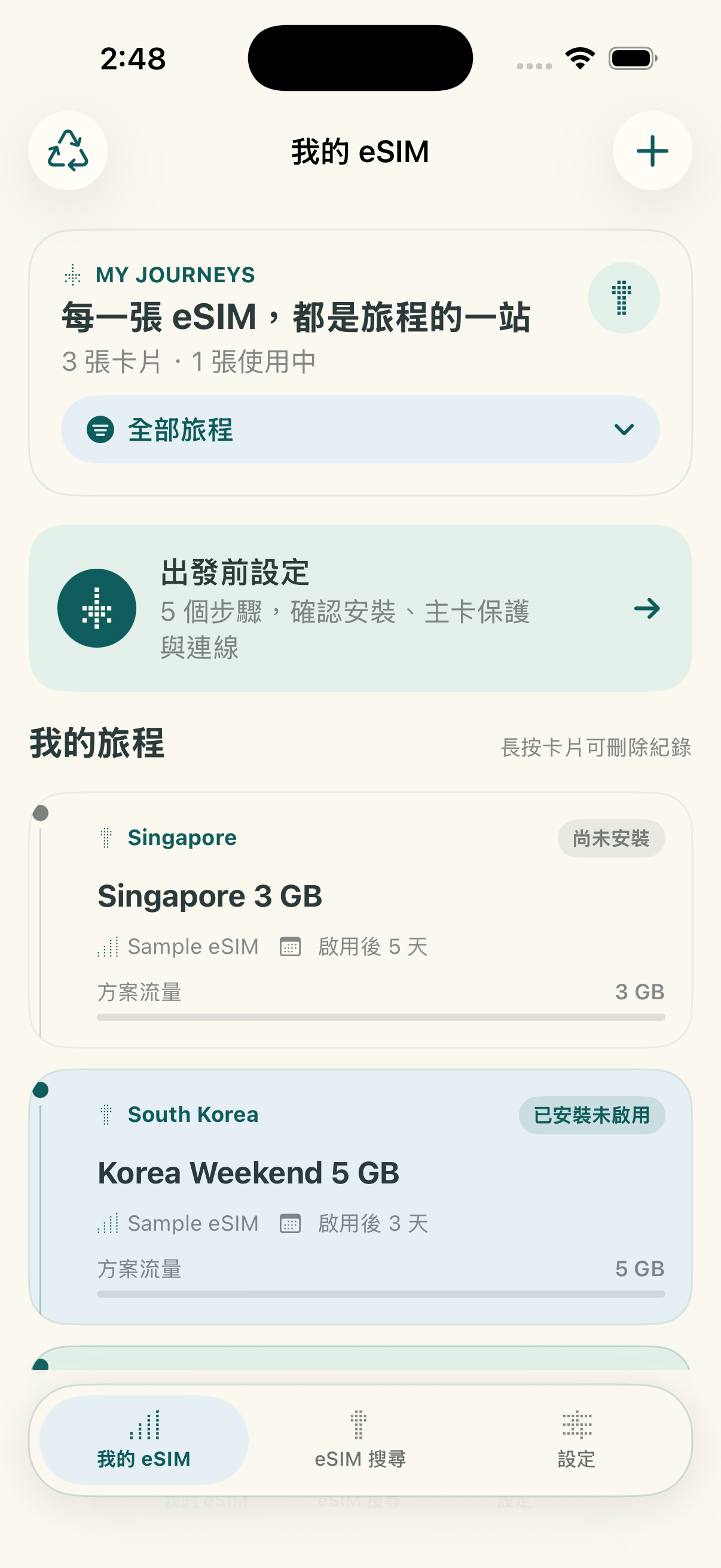
Primero local · sin nube propia Sin registro obligatorio Compatible con iOS 17.4+; instalación del sistema desde 17.5
🟢 In-App Conditioning · Expiration Countdown
Pantalla de inicio de eSIMManager iOS 1.8
🔒 Optional Password Encrypted Backup
iOS 1.8

Importa más rápido y organiza mejor cada viaje

La versión 1.8 ya está disponible en App Store. Las funciones esenciales de gestión siguen siendo gratuitas. La app incluye anuncios y una compra única opcional para eliminarlos de forma permanente; no es una suscripción.

Lista por etapas antes del viaje, al llegar y al regresar

Comprobaciones por etapa

Muestra los pasos adecuados antes de salir, al llegar y al regresar. La lista solo guarda tus confirmaciones; no cambia los datos móviles ni la itinerancia del iPhone.
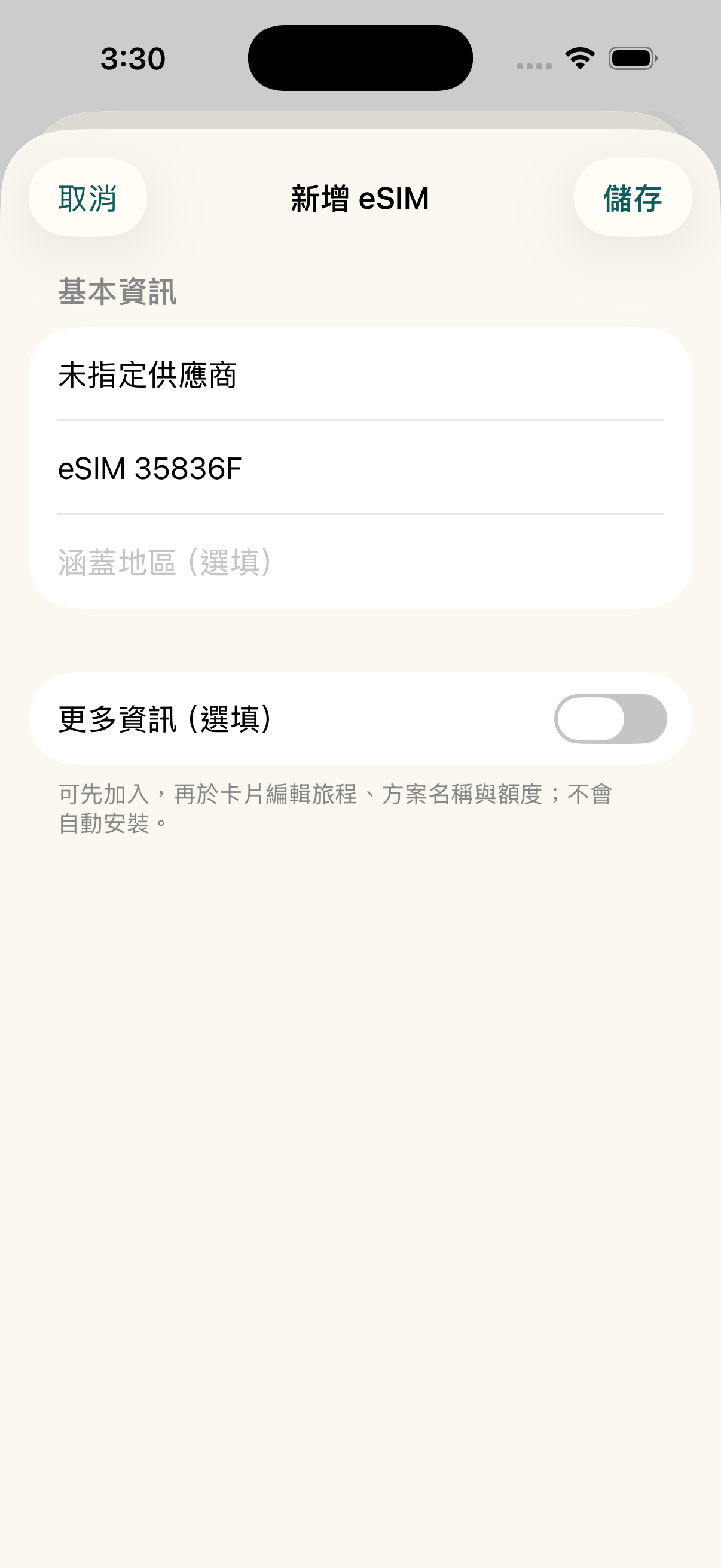
Pantalla de importación por lotes de varios códigos QR

Importación por lotes y duplicados

Reconoce varios códigos QR de eSIM desde una imagen o PDF, permite elegir los necesarios y comprueba duplicados antes de guardar.

Los anuncios los proporciona Google AdMob y dependen de la revisión de la plataforma y del inventario disponible. Si no se carga un anuncio, las funciones de gestión siguen disponibles. Apple muestra el precio local antes de la compra única.

Android Early Access

Prueba cerrada de Android: versión completa de regalo al lanzamiento

Gracias por ayudarnos a lanzar eSIMManager para Android. Quienes completen su colaboración en la prueba cerrada recibirán, tras el lanzamiento oficial, la versión completa de Android: todas las funciones actuales de gestión y eliminación permanente de anuncios.

1. Envíanos por correo la dirección de tu cuenta de Google usada en Google Play y espera la confirmación de inclusión en la lista. No publiques tu cuenta ni envíes contraseñas. 2. Tras la confirmación, abre el enlace de prueba con la misma cuenta, acepta participar como tester e instala la app desde Google Play. 3. Mantén la inscripción durante al menos 14 días consecutivos, prueba la importación QR, la gestión de tarjetas y la lista previa al viaje, y envía tu experiencia o problemas por correo. No se requieren reseñas positivas.

Tras el lanzamiento verificaremos las colaboraciones y enviaremos instrucciones individuales para recibir el beneficio. Un clic no lo desbloquea automáticamente. Solo para la app Android; excluye planes de datos eSIM, beneficios iOS y futuros servicios de pago.

Solicitar acceso por correo ¿Confirmado? Unirse a la prueba Actualmente solo para cuentas cuyo país de Google Play sea Taiwán. Si participas en la prueba interna, sal de ella antes de unirte a la cerrada. Descargar un APK, pulsar un enlace o estar en la lista no equivale a inscribirse. mkjohnny@gmail.com
Compromisos

Tú eliges el plan; eSIMManager lo organiza

No single supplier, no subscription thresholds, to help you organize dispersed travel eSIM information into a safe departure process.

Freedom to choose suppliers

Whether you get an eSIM from a travel platform, carrier, or other trusted outlet, you can organize the available activation information into an app. Offer prices, inventory, and service content will still be based on the vendor page you select.

Centralize multiple eSIMs

Keep the QR Code, LPA activation information, where applicable, expiration date, and memo in one place. Data is stored locally on your device; you can back up, share, or mark a trip as ended as needed.

Las funciones esenciales siguen siendo gratuitas

No hay límite de tarjetas. La guía de instalación, las comprobaciones previas, la cuenta atrás y la estimación local de uso siguen siendo gratuitas. La versión 1.8 añade anuncios y una compra única opcional para eliminarlos. Los datos móviles y la itinerancia deben confirmarse en iOS.

Resumen de funciones

Flujo real dentro de la app

Explore the main workflows and usage limitations through screens from the released app.

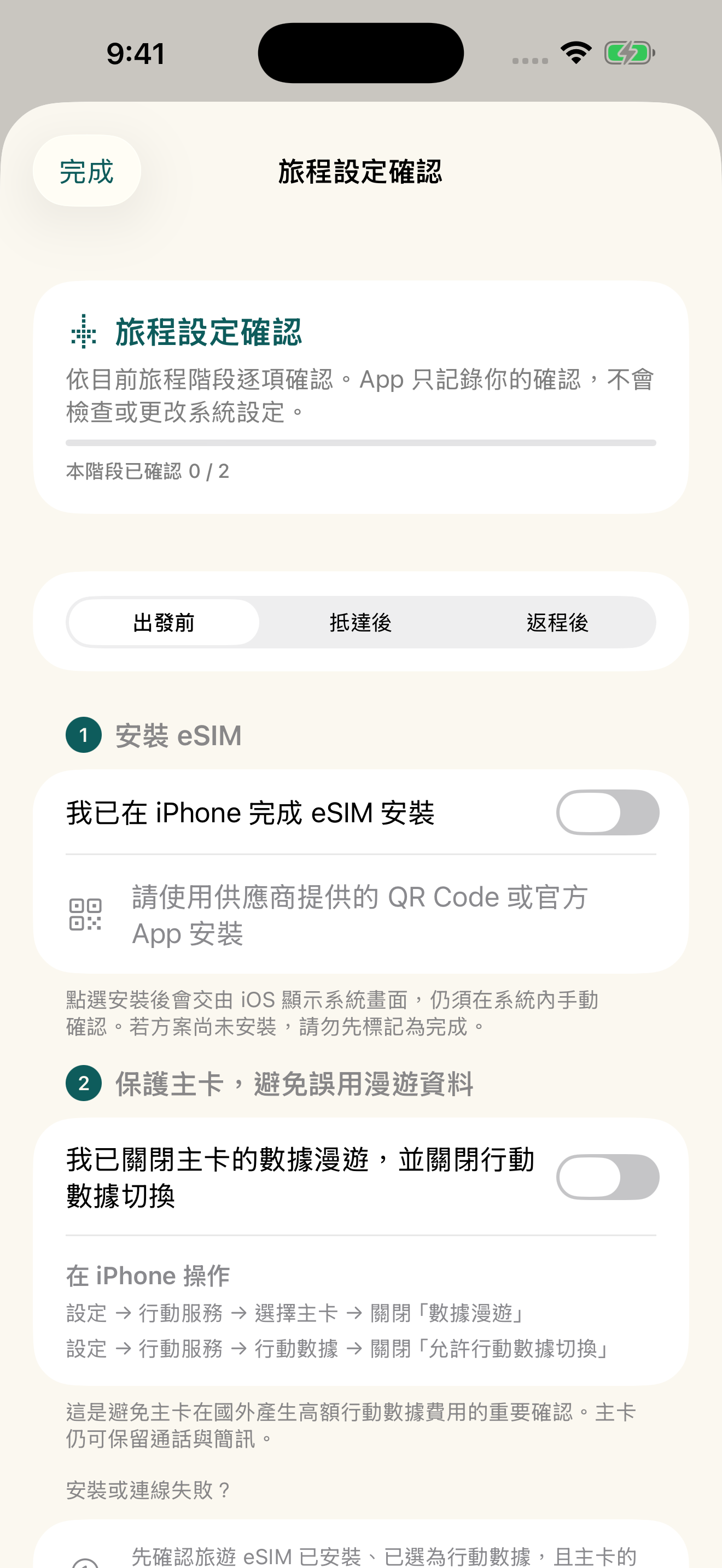
Antes de viajar from the homepage

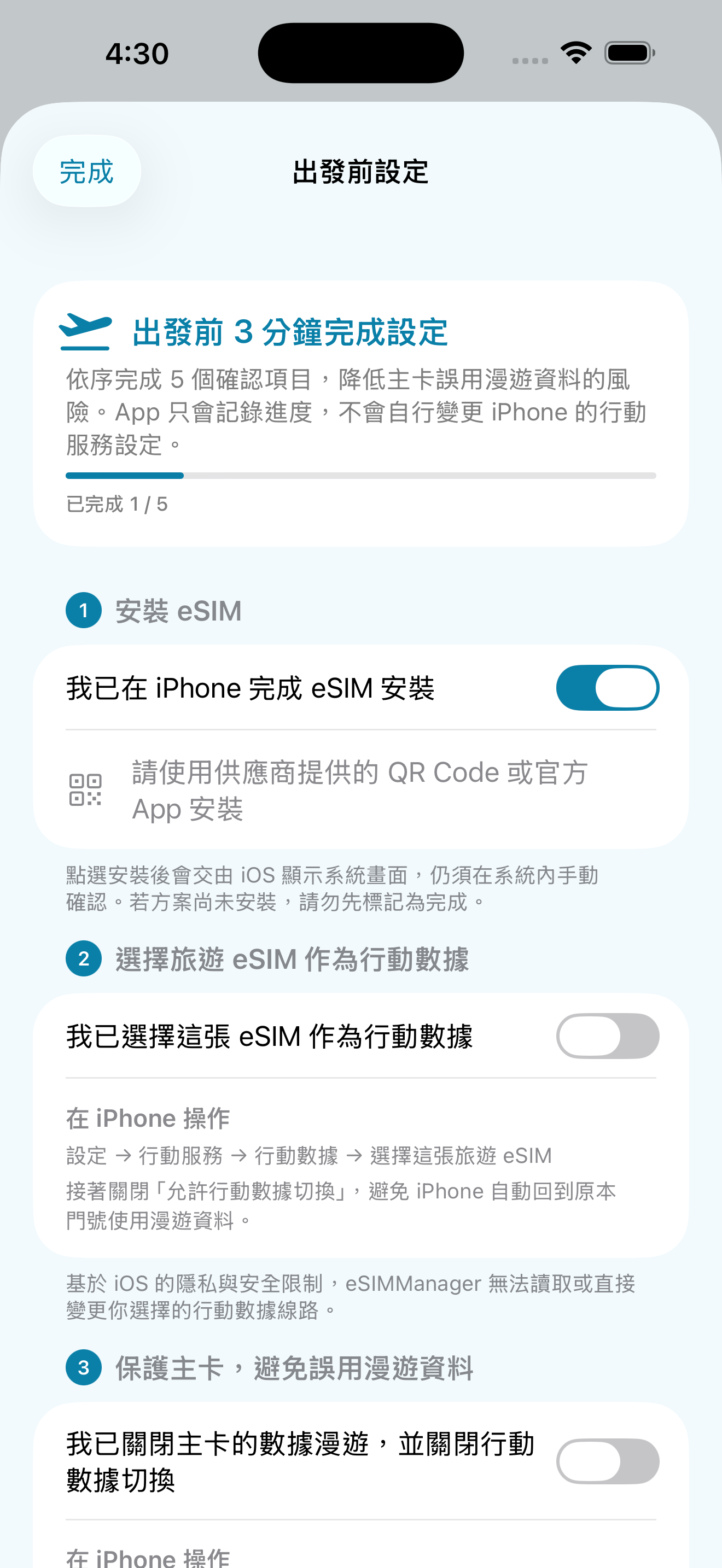
After creating a travel eSIM, the homepage provides a pre-departure portal for users to confirm important items in order.
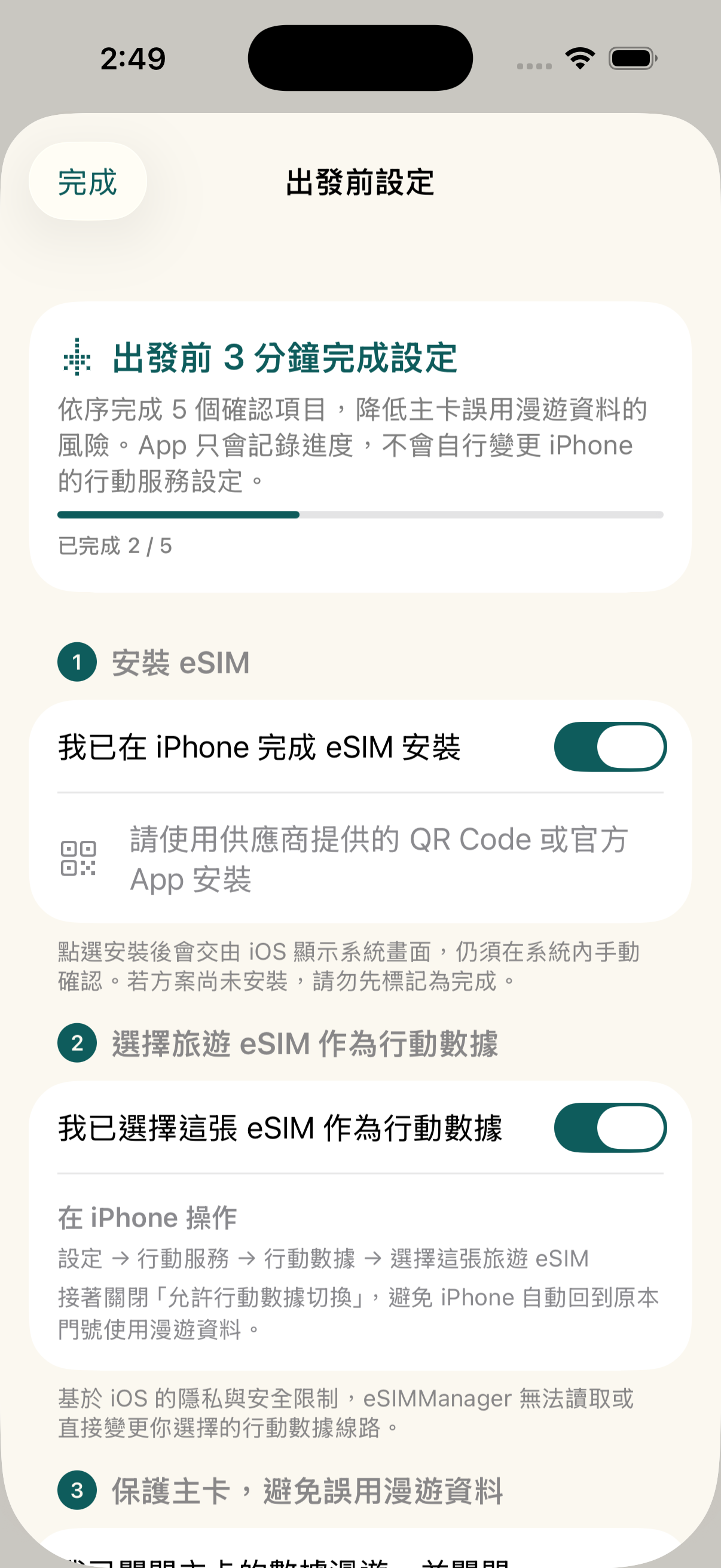
  • Five steps: Installation, Cellular Data, Master Card Protection, Roaming and Connectivity.
  • Primary Card Protection: Remind to turn off the main card data roaming and mobile data switching.
  • Set Path: Use the navigation path in iPhone Settings to help newbies check.
Tabi Antes de viajar精靈

Camera, Album, PDF and Manual 4-in-1 Import

Supports import of common LPA QR codes, images, PDFs, and full LPA strings; recognition depends on certificate format, document content, and image quality.
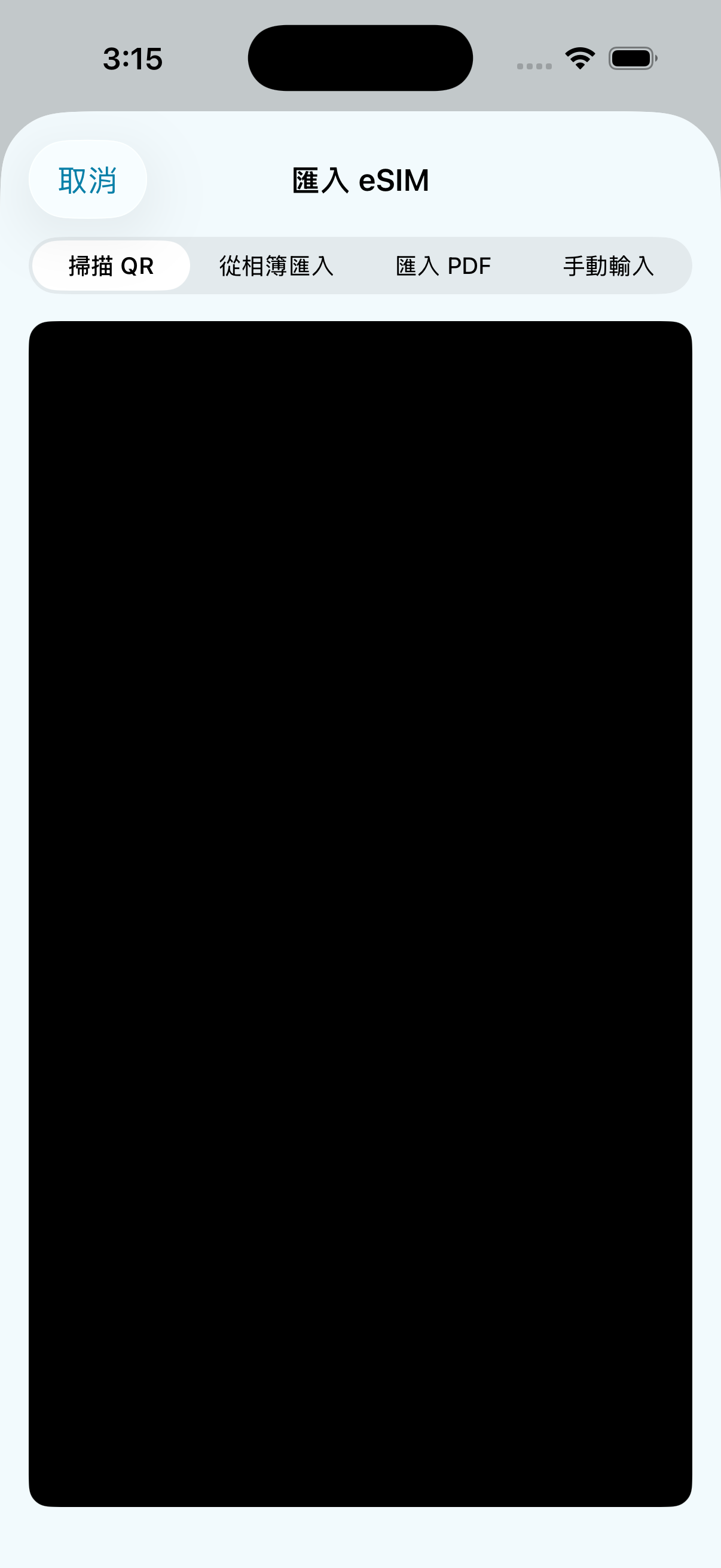
  • Camera Scanning: Aim for automatic parsing of paper or on-screen QR codes.
  • Album recognition: Read the QR code from the photo via the Apple Vision framework.
  • PDF Import: Directly select the PDF certificate document sent by the supplier.
  • Enter manually: Paste the full LPA activation code provided by the supplier.
匯入方式選單

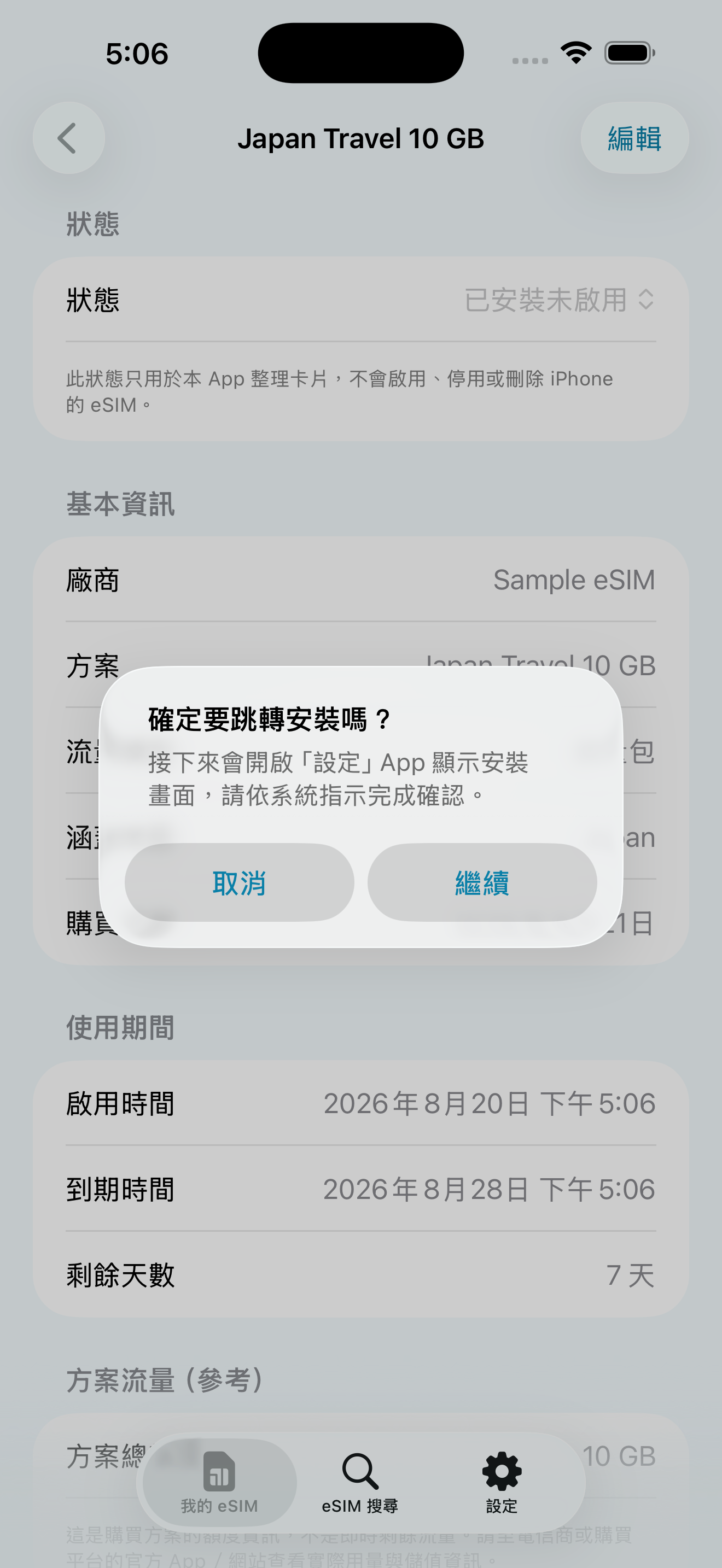
Open the iOS eSIM installation process

Cuando la información de activación esté completa y el dispositivo sea compatible, puedes intentar abrir el proceso de instalación de eSIM del sistema de Apple. La confirmación siempre debe hacerse manualmente en la pantalla de iOS, y el resultado depende de iOS, del dispositivo, de la red y del proveedor.
  • Installation flow guide: Click the button to display the iOS eSIM installation screen.
  • Confirm manually: The app can't silently install, enable, or change your iPhone's mobile settings.
  • Conditions of use: Requires iOS 17.5+, eSIM-enabled iPhone, active information, and internet connection.
系統安裝與Confirm manually引導

Primary card protection to avoid misuse of roaming data

Make sure your primary card's “Data Roaming” and “Allow Mobile Data Switching” are turned off before you leave the country, reducing the risk of high roaming charges.

  • Master Card Data Roaming: Confirm deactivation in Settings > Mobile Services > Master Card.
  • Mobile data toggle: Confirm to turn off in Settings > Mobile Services > Mobile Data.
  • Will not change automatically: The app only provides onboarding and confirmation, and the setup is still done by the user on the iPhone.
Primary Card Protection設定引導

Choose a language you're familiar with in the app

You can switch the language of the app interface directly during your trip, or choose to follow the language of the iPhone system.
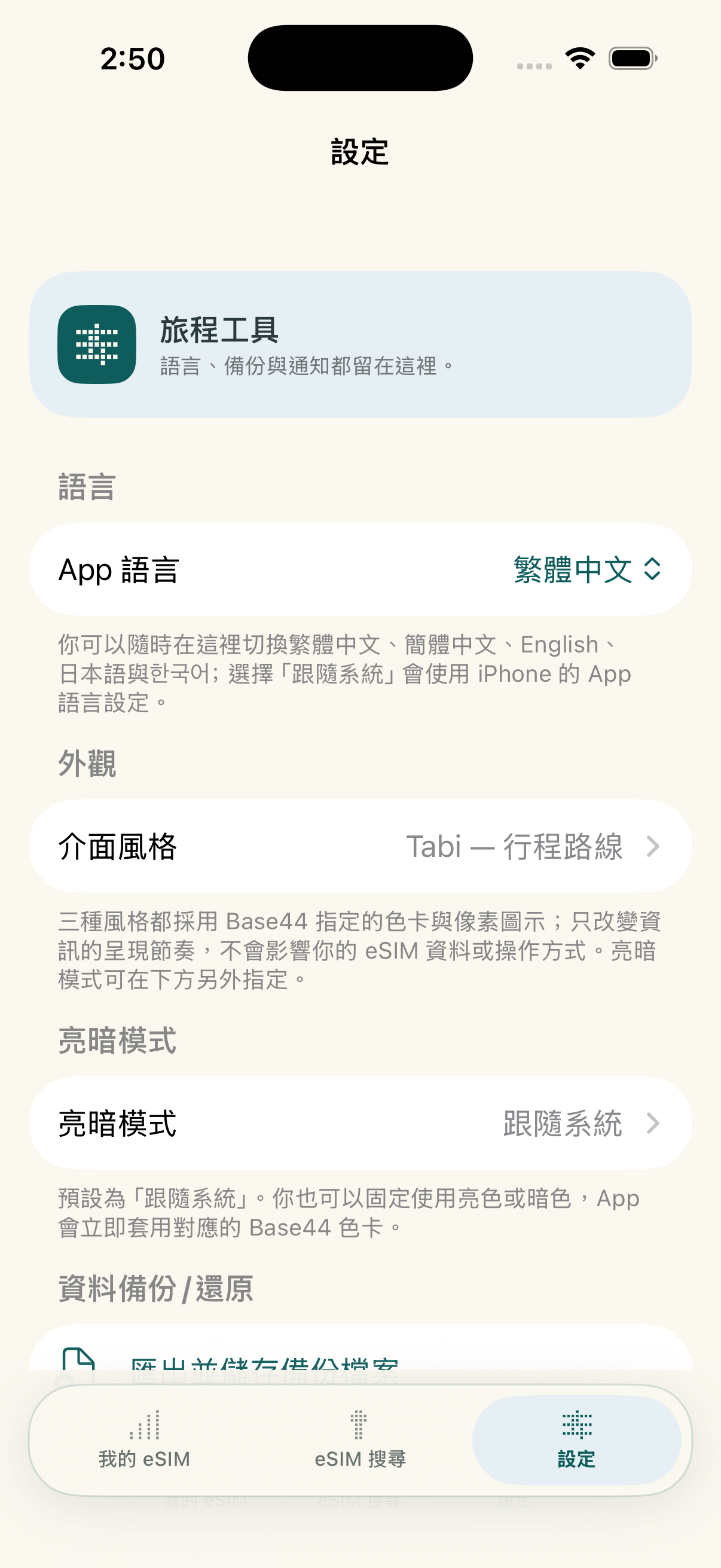
  • Traditional Chinese/Simplified Chinese: Supports frequently used interfaces for Taiwanese and Chinese-speaking travelers.
  • English/Japanese/: Supports language selection in key travel markets.
  • Follow the system: Displays automatically according to your iPhone's app language settings.
App 外觀與語言設定

Switching Phone Backup and Restore

You can export a JSON backup and import card records on a new device; when you set a password, the backup is encrypted with AES-GCM.
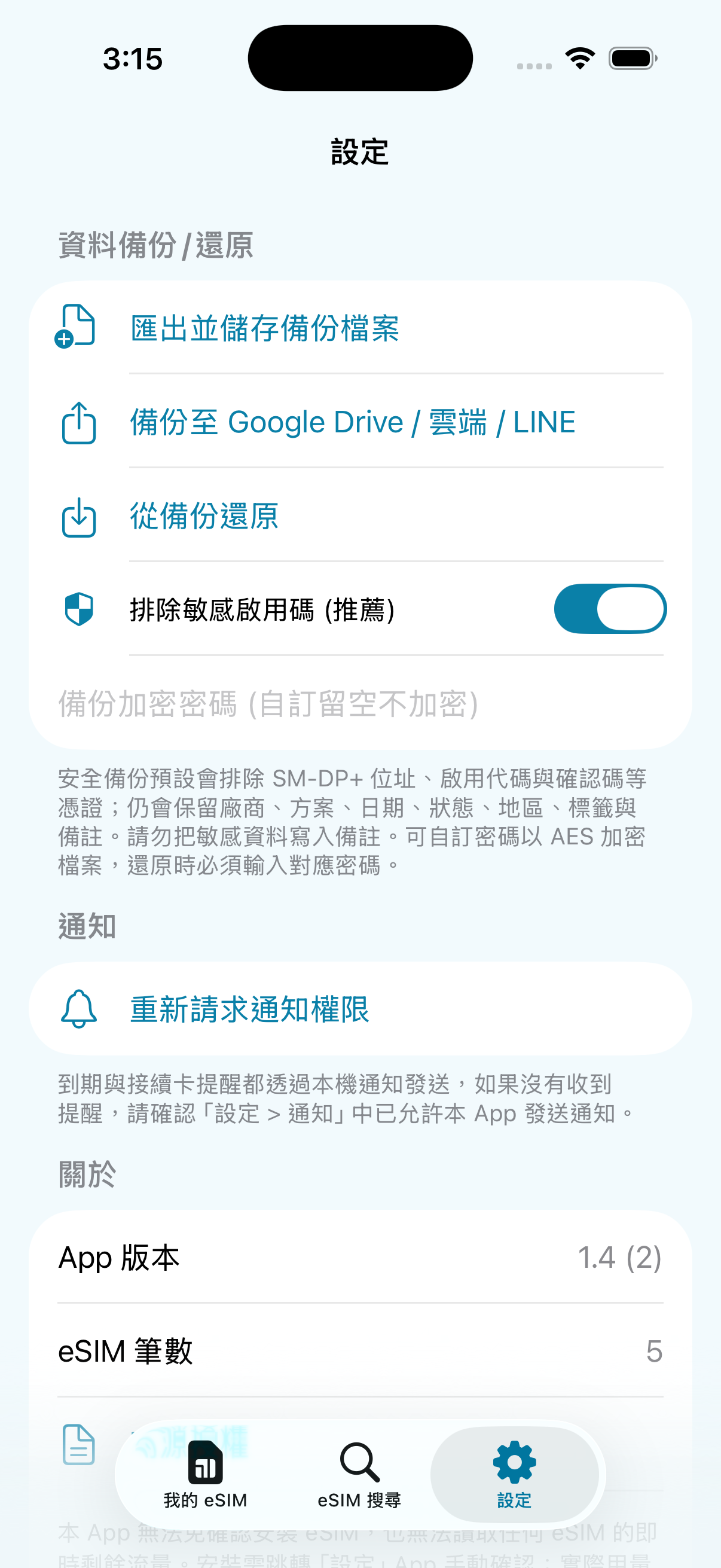
  • 🔐 Optional password encryption: After setting the password, it is encrypted with AES-256-GCM; backups without a password are not encrypted, please keep it properly.
  • 📁 Flexible storage: Can be sent in the File app, iCloud Drive, or AirDrop.
  • Sensitive information exclusion: The activation code is excluded by default; such backups restore the card history but cannot be used directly for system installation.
設定與備份分頁
Cómo usarlo

Desde elegir un plan hasta cerrar el viaje

Seis pasos para comprar, importar, instalar, activar, revisar el uso y cerrar el viaje. Desliza horizontalmente para ver cada paso.


女性旅人用 eSIMManager 掃描供應商 QR Code 的插圖
2Scan import after receiving QR codeUse your app camera to add activation info to your card history
eSIMManager 確認開啟 iOS eSIM 安裝流程的實機畫面
3Once confirmed, the iOS installation process will be triggeredSystem installation still needs to be done manually on the iPhone setup screen
女性旅人抵達目的地後準備啟用旅遊 eSIM 的插圖
4When you arrive, follow the instructions to activateConfigure data roaming or enable services based on plan rules
女性旅人旅行中查看行動流量估算的插圖
5See traffic estimates while travelingOpen the card if in doubt to check the progress of the local estimation
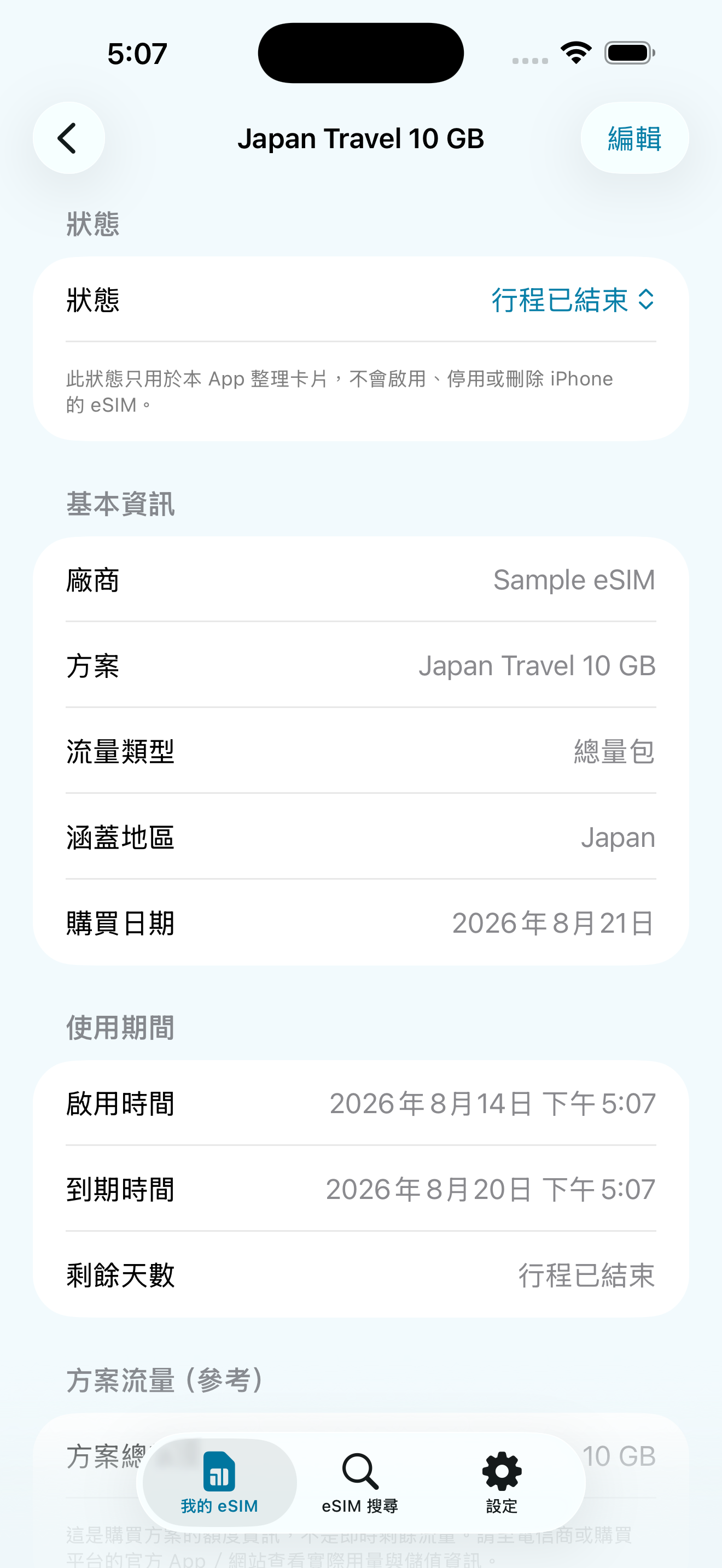
eSIMManager 顯示行程已結束的實機畫面
6Trip ended, indicating that the trip has endedKeep records for future reference and organization
  1. Pre-Departure: Installation and Master Card Protection CompleteConfirm that the travel eSIM is installed and selected as mobile data, and close the main card "Data roaming" and "Allow mobile data switching".
  2. Upon arrival: Enabled by supplier rulesSome programs must be activated upon arrival, or data roaming for travel eSIM must be turned on.
  3. On trip: Confirm connection to start local estimationTraffic figures are device-side estimates, not real-time carrier balances.
Important: eSIMManager does not make changes to the iPhone's mobile data lines, roaming settings, or carrier account balances; each step is confirmed by the user according to the instructions of the iPhone and the supplier.
eSIMManager Antes de viajar精靈實機畫面
Real-world app screens: pre-departure, post-arrival, and on-trip confirmations.
Ocho idiomas

You can switch between Traditional Chinese, Simplified Chinese, English, Japanese, Japanese, or choose to follow the iPhone system language in the app.
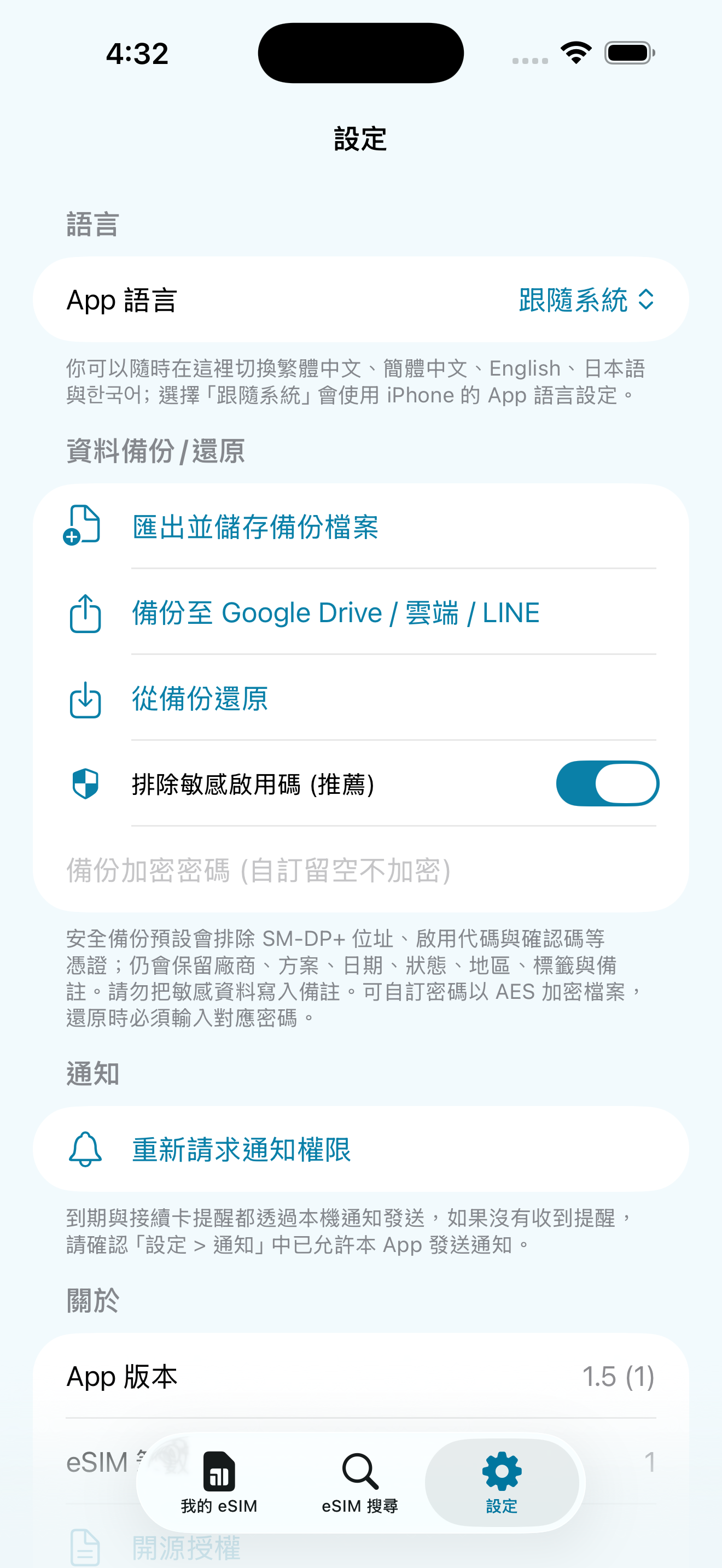
eSIMManager App 語言設定畫面
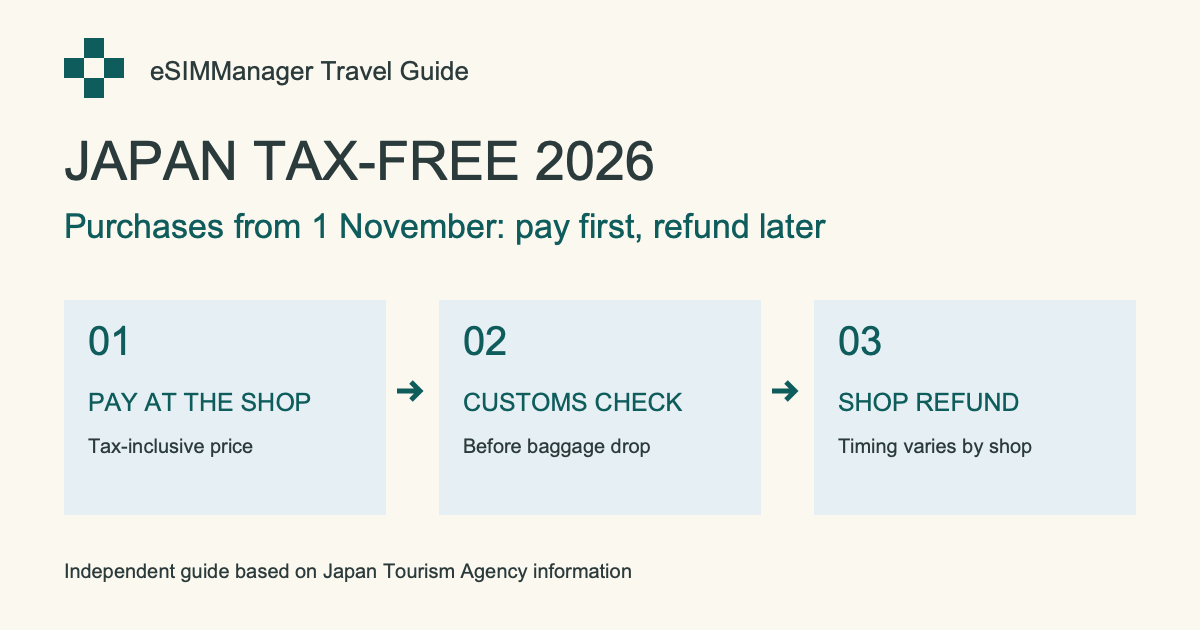
Novedades para viajar a Japón · 2026/11/01

Compras libres de impuestos en Japón: cambios en noviembre de 2026

Fechas de compra, aduanas, equipaje y reembolsos: una guía basada en fuentes oficiales.

Leer la guía en inglés →

Comprar eSIM / datos de viaje

Tú eliges el plan, nosotros ayudamos a organizarlo

Obtén primero el código QR o la información de activación LPA y luego usa eSIMManager para organizarla y seguir la guía de configuración. Los enlaces siguientes llevan a tiendas y plataformas externas como Klook, KKday, Airalo y Trip.com; los planes, precios, disponibilidad y reglas de activación reales dependen de cada plataforma.

Recomendación de compra eSIM Shopee shrimp skin shopping

Flying Show Shop

Browse eSIM and travel card plans; confirm your destination, days of use, how to activate, and item descriptions before placing your order.

GO TO store

The above are the official advertisements or referral links provided by external stores and platforms; some of the links may contain referral/profit sharing parameters. The actual price, promotion and service content are subject to the pages of each platform. After clicking, you will leave the eSIMManager website, and the transactions, goods and services are provided by each store or platform in accordance with its terms.

Transparencia técnica y límites

In order to protect the user's right to know and to align the system with how it really works, we would like to explain the technical rationale and limitations of this app:

"Traffic is device-side estimation" Technical Instructions

The mobile traffic statistics of this app are collected through the Darwin BSD underlying getifaddrs interface, reading local pdp_ip* The cumulative number of transceiver bytes in the mobile data channel. This isDevice-side network traffic estimation reference: Unable to identify which eSIM is actually being used, traffic from other SIMs, interface resets, data waiver offers, and billing cycles can all cause discrepancies. Estimates are updated when the app returns to the outlook, not the carrier's live bill; actual remaining balance is subject to the carrier's official system.

iOS System Installation Process and Permission Regulations

Por razones de seguridad de iOS, las apps de terceros no pueden instalar una eSIM silenciosamente en segundo plano ni cambiar la línea de datos móviles del usuario. “Iniciar instalación” solo intenta abrir el proceso del sistema de Apple; que aparezca y se complete depende de la versión de iOS, el dispositivo, la red, los datos de activación y el proveedor. El usuario debe confirmar manualmente en la pantalla del sistema.

Colaboración

Working together to create a better travel network card ecosystem

eSIMManager focuses on providing pure, high-quality local management tools. We welcomeCarriers, eSIM publishers, travel platforms, and partnersNegotiate appropriate leads, brand exposure, and content collaboration.

Carriers and network card issuers

Negotiate ways to collaborate on standard LPA QR Code compatibility information, brand exposure, and exclusive offers.

Travel & Platform Partners

Travel platform leads, co-branding campaigns, and diverse business project proposals.

Business Cooperation Inquiries

Fill out the form below or send it directly to the official mailbox and we'll get back to you as soon as we can.

Asked Questions

Have questions about using? Take a look here

No. eSIMManager is a management and configuration facilitator that does not issue eSIM and does not restrict which vendor you buy from. As long as the supplier provides valid QR code or LPA activation information, you can organize, install, and configure according to the app and the supplier's instructions. External referral links on the website may include revenue parameters, but transactions, prices, inventory and after-sales service are provided by the supplier.
Debido a las limitaciones de seguridad de iOS, ninguna app de terceros puede instalar una eSIM directamente en segundo plano. El botón solo intenta abrir el proceso del sistema de Apple; confirma manualmente en la pantalla de iOS. Si el proceso no aparece o falla, verifica iOS 17.5+, la red, la validez de los datos de activación y el soporte del proveedor, o usa el código QR / la app oficial del proveedor.
Please ensure that the QR code or document contains valid LPA activation information (common content is LPA:1$ Beginning). Image quality, supplier format, or protected PDF may affect identification; use Manual Input instead to paste the complete LPA string provided by the supplier, or request a standard certificate from the supplier.
Normal. This function counts the throughput of the iPhone's mobile data interface, and it is not possible to identify which eSIM is actually used; the amount of other SIMs, interface resets, traffic-free offers, and different billing cycles may cause a gap. Estimates are only updated when the app returns to the outlook and are for travel reference only; the exact balance is subject to the carrier's official system.
Cards are not automatically uploaded to the cloud in this app. JSON can be exported before switching over to Configure ➔ Data Backup; passwords are encrypted. The default backup excludes the activation code, so you can restore the card history, but it may not be possible to reinstall eSIM directly; choose whether to include sensitive information and save the file properly if necessary.

Choose your plan and travel with peace of mind

Download eSIMManager for free today and organize every travel eSIM into a clear, secure departure flow.
Otras apps que desarrollamos
Card Master · 人脈大師

Card Master · 人脈大師

Organiza tus viajes y mantén tus contactos a mano.

Convierte tarjetas de visita en papel en datos de contacto que puedes buscar y editar. Escanea tarjetas, organízalas en grupos y protege las tarjetas privadas.

  • Escaneo de tarjetas de visita
  • Grupos y búsqueda
  • Tarjetas privadas y copias cifradas

iPhone · Interfaz en chino tradicional · Disponible en el App Store de Taiwán. Descarga gratuita con anuncios y compras integradas. Una compra única elimina los anuncios permanentemente y desbloquea funciones profesionales. Comprueba los datos reconocidos con la tarjeta original.
Ver en el App Store ↗