iOS 1.8 ist verfügbar · Stapelimport, Reiseorganisation und schrittweise Einrichtung

Wähle deine eSIM frei. Verwalte jede Reise mit mehr Sicherheit.

Nicht an eine einzelne eSIM-Marke gebunden. Vergleiche Angebote nach Budget und Reiseplan und verwalte Karten, Aktivierungsdaten und Gültigkeit in eSIMManager. Einstellungen, Installation und tatsächliche Nutzung richten sich weiterhin nach iOS und dem jeweiligen Anbieter.
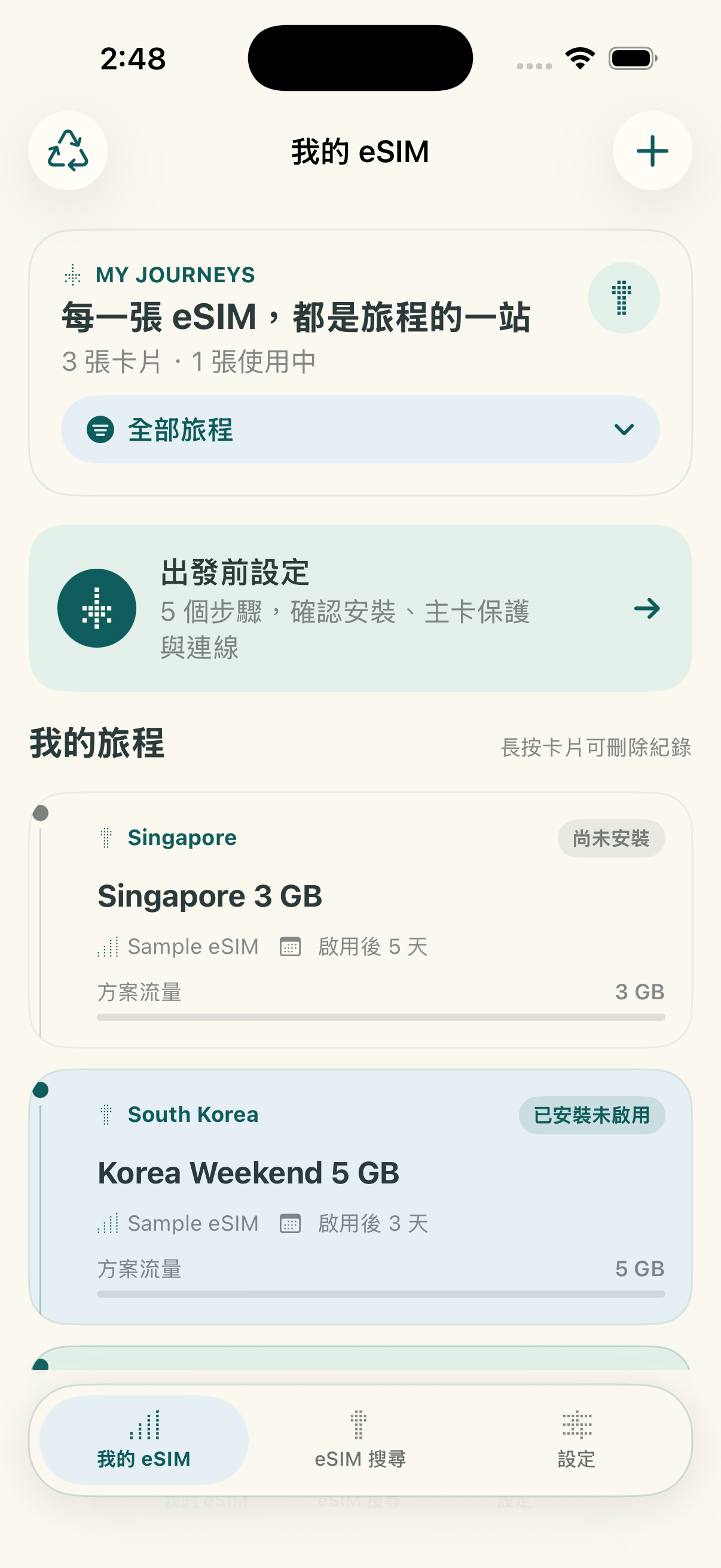
Lokal zuerst · keine eigene Cloud Keine Registrierung erforderlich iOS 17.4+; Systeminstallation ab 17.5
🟢 In-App Conditioning · Expiration Countdown
eSIMManager iOS 1.8 Startbildschirm
🔒 Optional Password Encrypted Backup
iOS 1.8

Schneller importieren, Reisen übersichtlicher verwalten

Version 1.8 ist im App Store verfügbar. Die grundlegenden Verwaltungsfunktionen bleiben kostenlos. Die App enthält Werbung und einen optionalen einmaligen Kauf zum dauerhaften Entfernen der Werbung – kein Abonnement.

Checkliste vor Abreise, nach Ankunft und bei Rückkehr

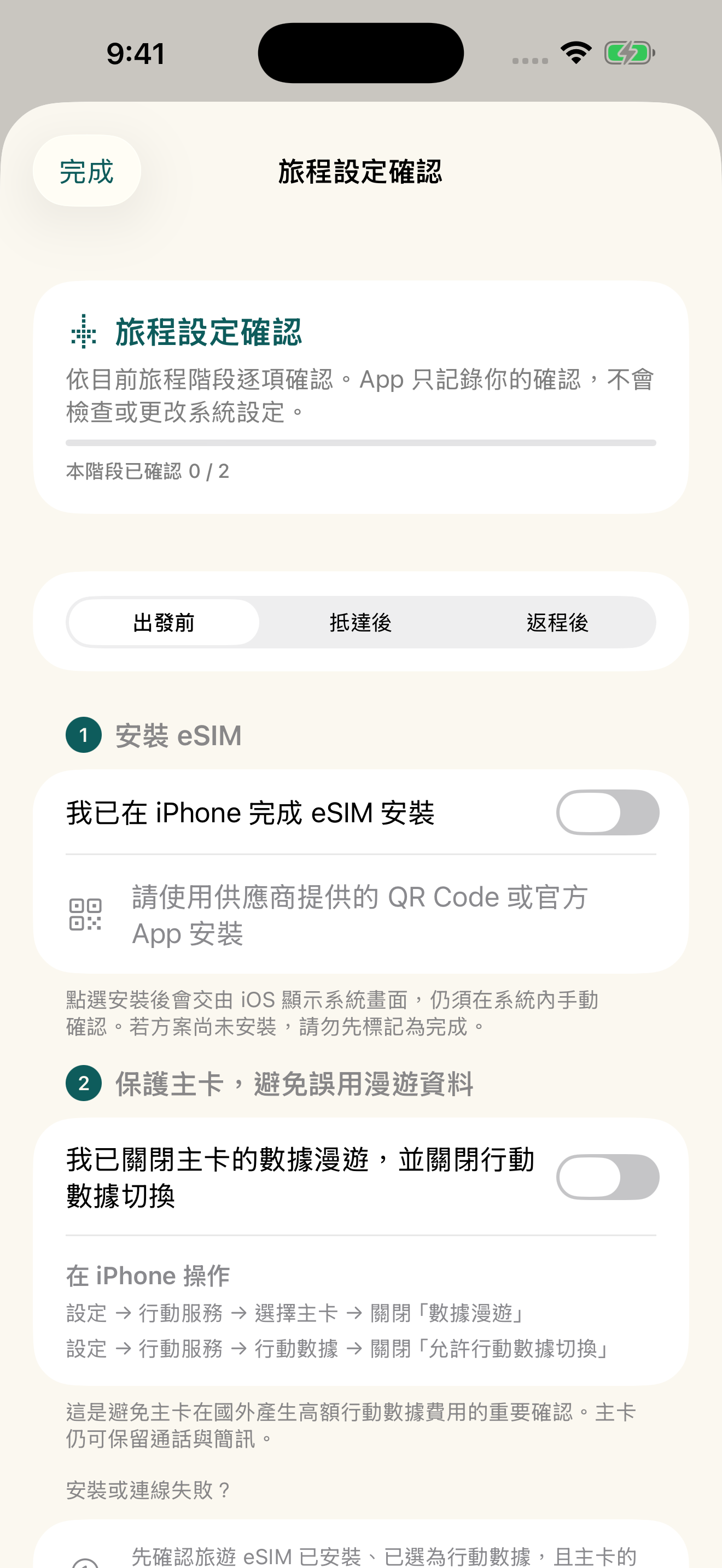
Reiseprüfungen nach Phase

Zeigt die passenden Schritte vor der Abreise, nach der Ankunft und bei der Rückkehr. Die Liste speichert nur Ihre Bestätigungen und ändert keine Mobilfunk- oder Roaming-Einstellungen des iPhone.
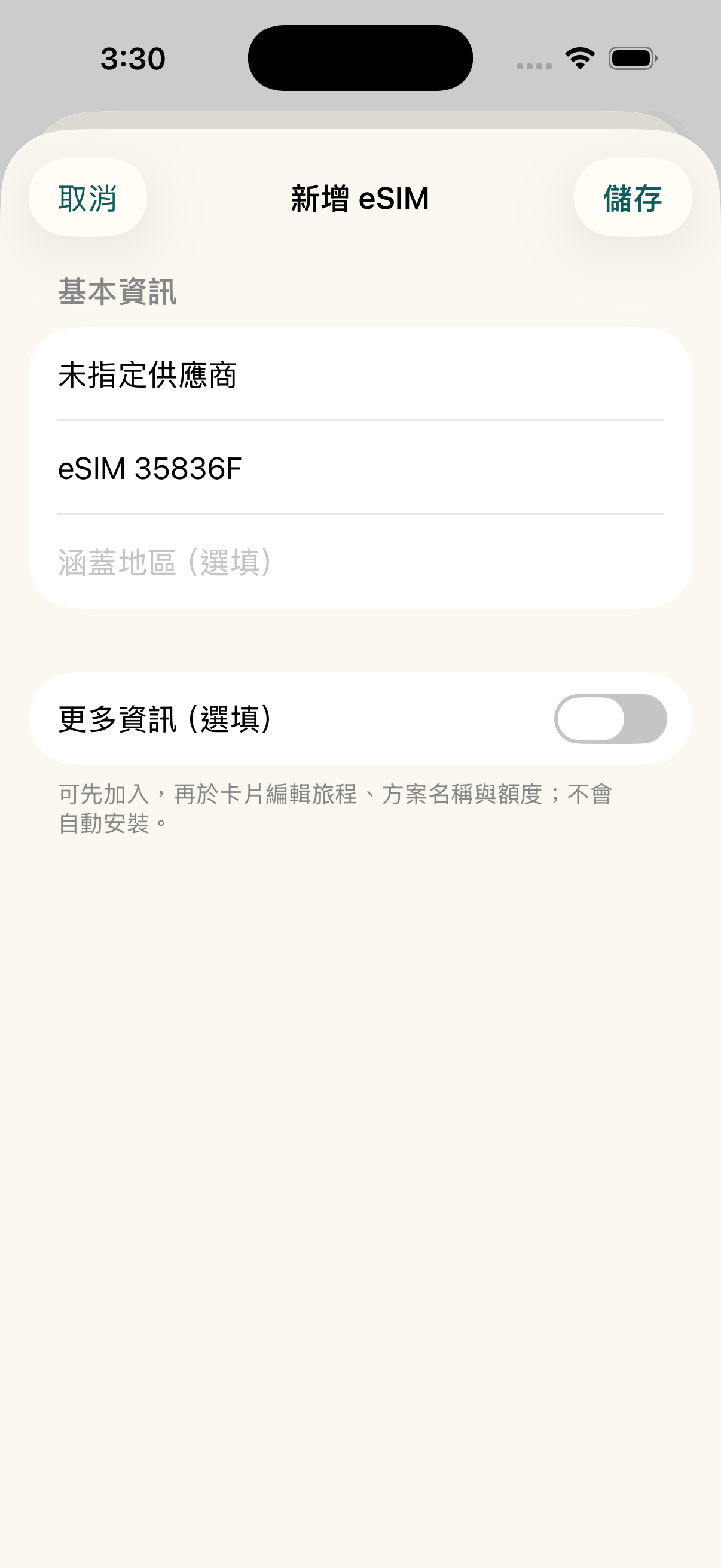
Stapelimport mehrerer QR-Codes

Stapelimport und Duplikatprüfung

Erkennt mehrere eSIM-QR-Codes aus Bildern oder PDFs. Wählen Sie die gewünschten Einträge aus und prüfen Sie Duplikate vor dem Speichern.

Werbung wird von Google AdMob bereitgestellt und hängt von Plattformprüfung und Verfügbarkeit ab. Ohne geladene Werbung bleiben alle Verwaltungsfunktionen nutzbar. Apple zeigt vor dem einmaligen Kauf den lokalen Preis an.

Android Early Access

Android geschlossener Test — Vollversion zum Start geschenkt

Danke, dass du uns beim Start von eSIMManager für Android hilfst. Frühe Tester, die ihren Beitrag zum geschlossenen Test abschließen, erhalten nach dem offiziellen Start die Android-Vollversion: alle aktuellen Verwaltungsfunktionen und dauerhaft keine Werbung.

1. Schicke uns die E-Mail-Adresse deines Google-Play-Kontos per E-Mail und warte auf die Bestätigung der Aufnahme in die Testliste. Veröffentliche dein Konto nicht und sende niemals ein Passwort. 2. Öffne danach den Testlink unten mit demselben Google-Konto, melde dich als Tester an und installiere die App über Google Play. 3. Bleibe mindestens 14 Tage ohne Unterbrechung angemeldet, probiere QR-Import, Kartenverwaltung und die Checkliste vor der Abreise aus und sende uns Erfahrungen oder Probleme per E-Mail. Positive Bewertungen sind nicht erforderlich.

Nach dem Start prüfen wir die Testbeiträge und informieren berechtigte Tester persönlich über die Freischaltung. Ein Linkklick schaltet nichts automatisch frei. Nur für die Android-App; eSIM-Datentarife, iOS-Vorteile und künftige kostenpflichtige Dienste sind ausgeschlossen.

Per E-Mail anmelden Bestätigt? Dem Test beitreten Aktuell nur für Konten mit Google-Play-Land Taiwan. Verlasse zuerst den internen Test, falls du daran teilnimmst, und tritt dann dem geschlossenen Test bei. Ein APK-Download, ein Linkklick oder ein Listeneintrag allein zählt nicht als Anmeldung. mkjohnny@gmail.com
Grundsätze

Du wählst den Tarif; eSIMManager organisiert ihn

No single supplier, no subscription thresholds, to help you organize dispersed travel eSIM information into a safe departure process.

Freedom to choose suppliers

Whether you get an eSIM from a travel platform, carrier, or other trusted outlet, you can organize the available activation information into an app. Offer prices, inventory, and service content will still be based on the vendor page you select.

Centralize multiple eSIMs

Keep the QR Code, LPA activation information, where applicable, expiration date, and memo in one place. Data is stored locally on your device; you can back up, share, or mark a trip as ended as needed.

Grundfunktionen bleiben kostenlos

Es gibt kein Kartenlimit. Installationshilfe, Prüfungen vor der Abreise, Ablauf-Countdown und lokale Verbrauchsschätzung bleiben kostenlos. Version 1.8 enthält Werbung und einen optionalen einmaligen Kauf zum Entfernen der Werbung. Mobilfunkdaten und Roaming müssen weiterhin in iOS bestätigt werden.

Funktionsübersicht

Der echte Ablauf in der App

Explore the main workflows and usage limitations through screens from the released app.

Vor der Abreise from the homepage

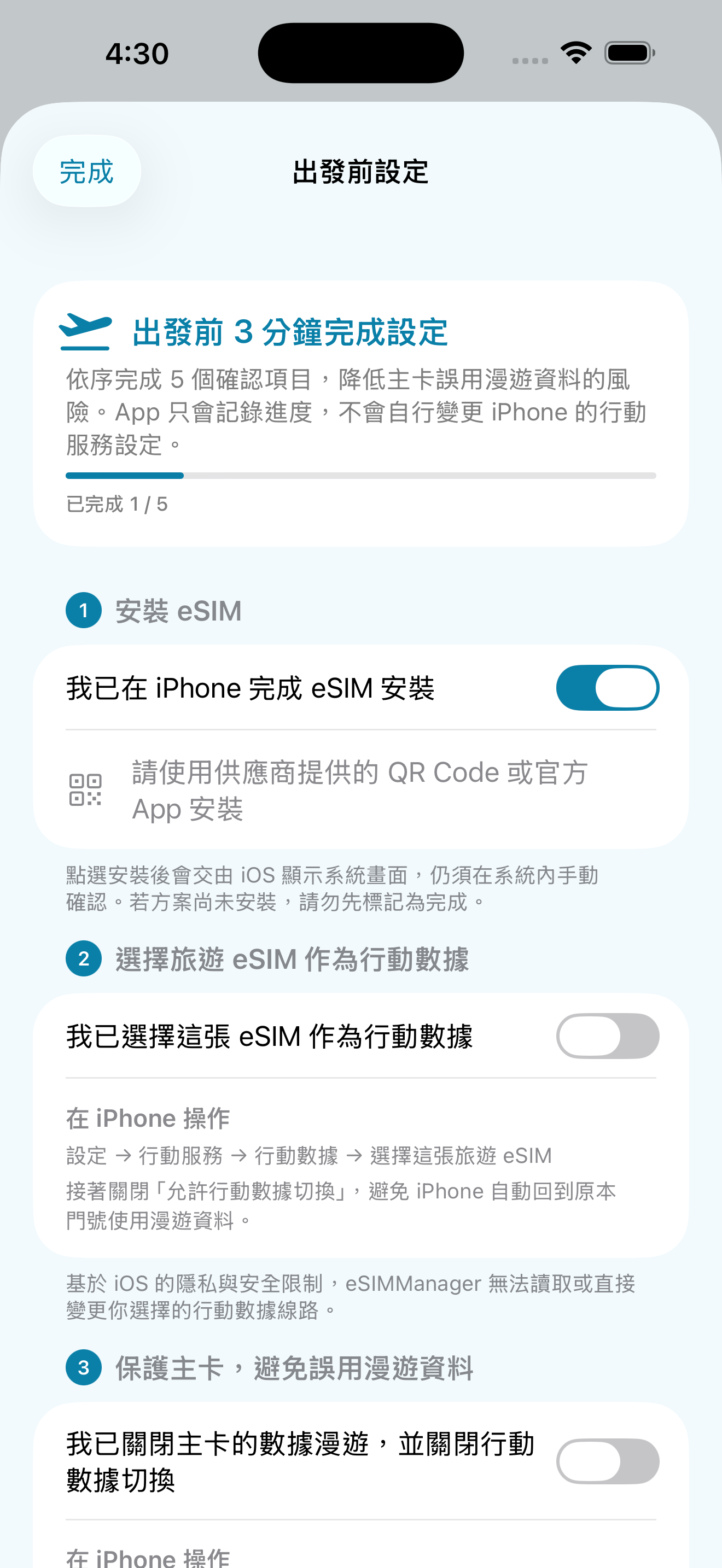
After creating a travel eSIM, the homepage provides a pre-departure portal for users to confirm important items in order.
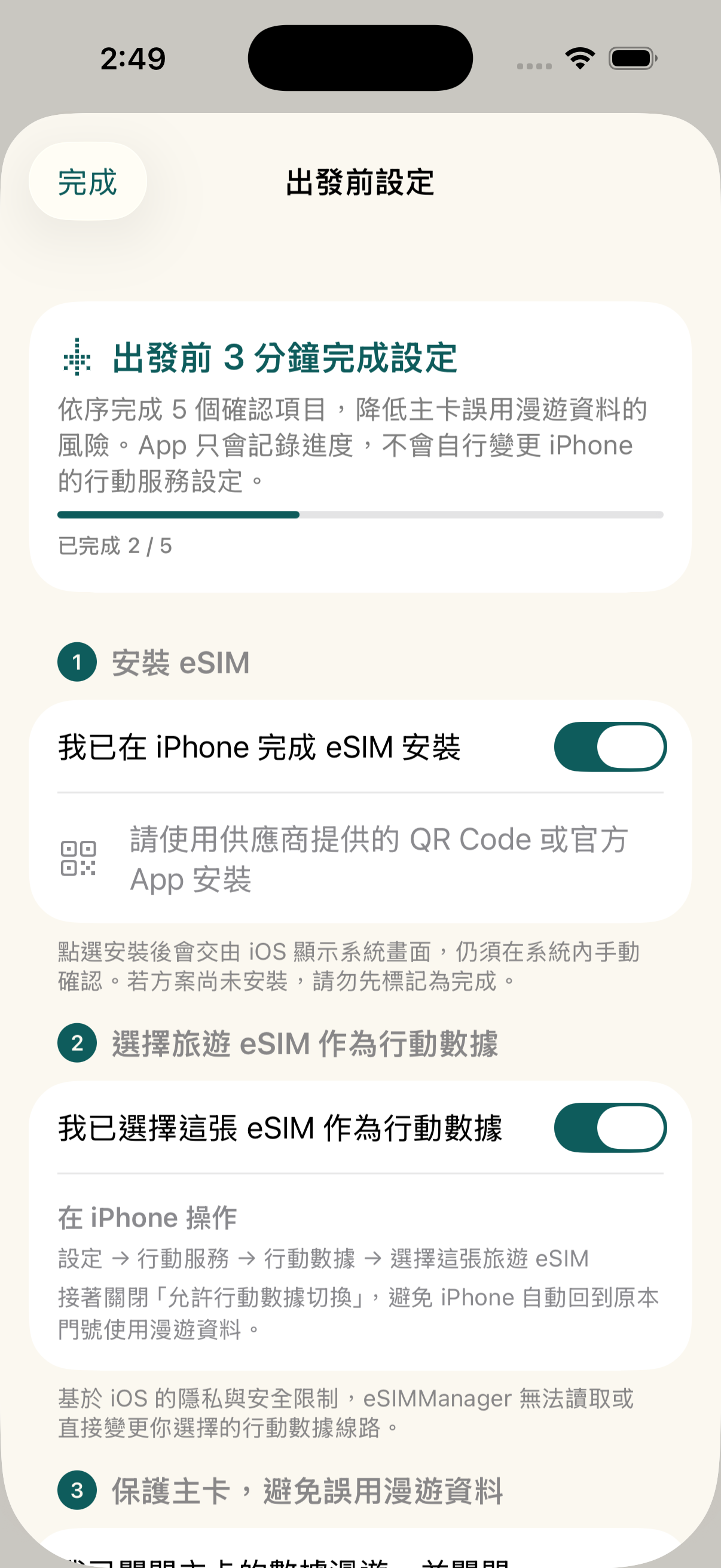
  • Five steps: Installation, Cellular Data, Master Card Protection, Roaming and Connectivity.
  • Primary Card Protection: Remind to turn off the main card data roaming and mobile data switching.
  • Set Path: Use the navigation path in iPhone Settings to help newbies check.
Tabi Vor der Abreise精靈

Camera, Album, PDF and Manual 4-in-1 Import

Supports import of common LPA QR codes, images, PDFs, and full LPA strings; recognition depends on certificate format, document content, and image quality.
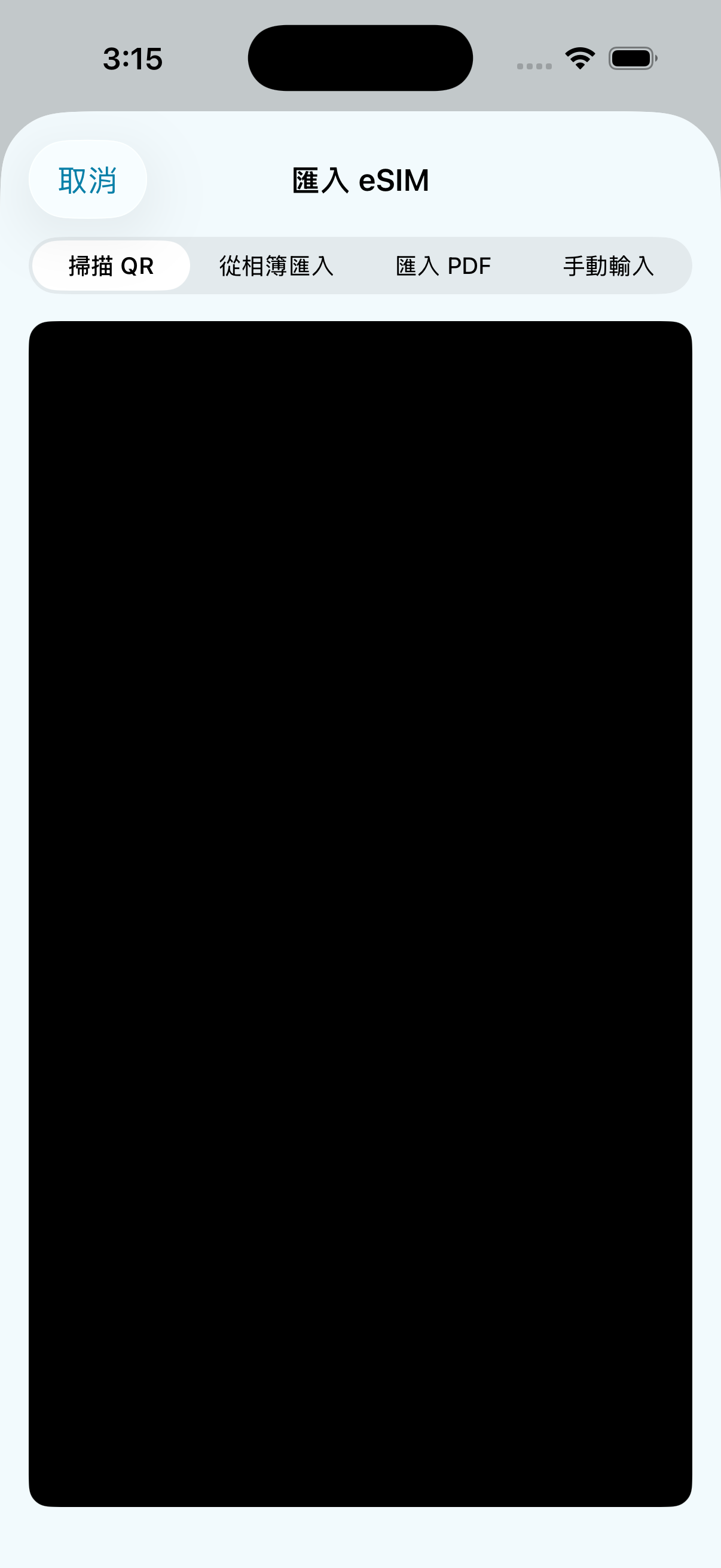
  • Camera Scanning: Aim for automatic parsing of paper or on-screen QR codes.
  • Album recognition: Read the QR code from the photo via the Apple Vision framework.
  • PDF Import: Directly select the PDF certificate document sent by the supplier.
  • Enter manually: Paste the full LPA activation code provided by the supplier.
匯入方式選單

Open the iOS eSIM installation process

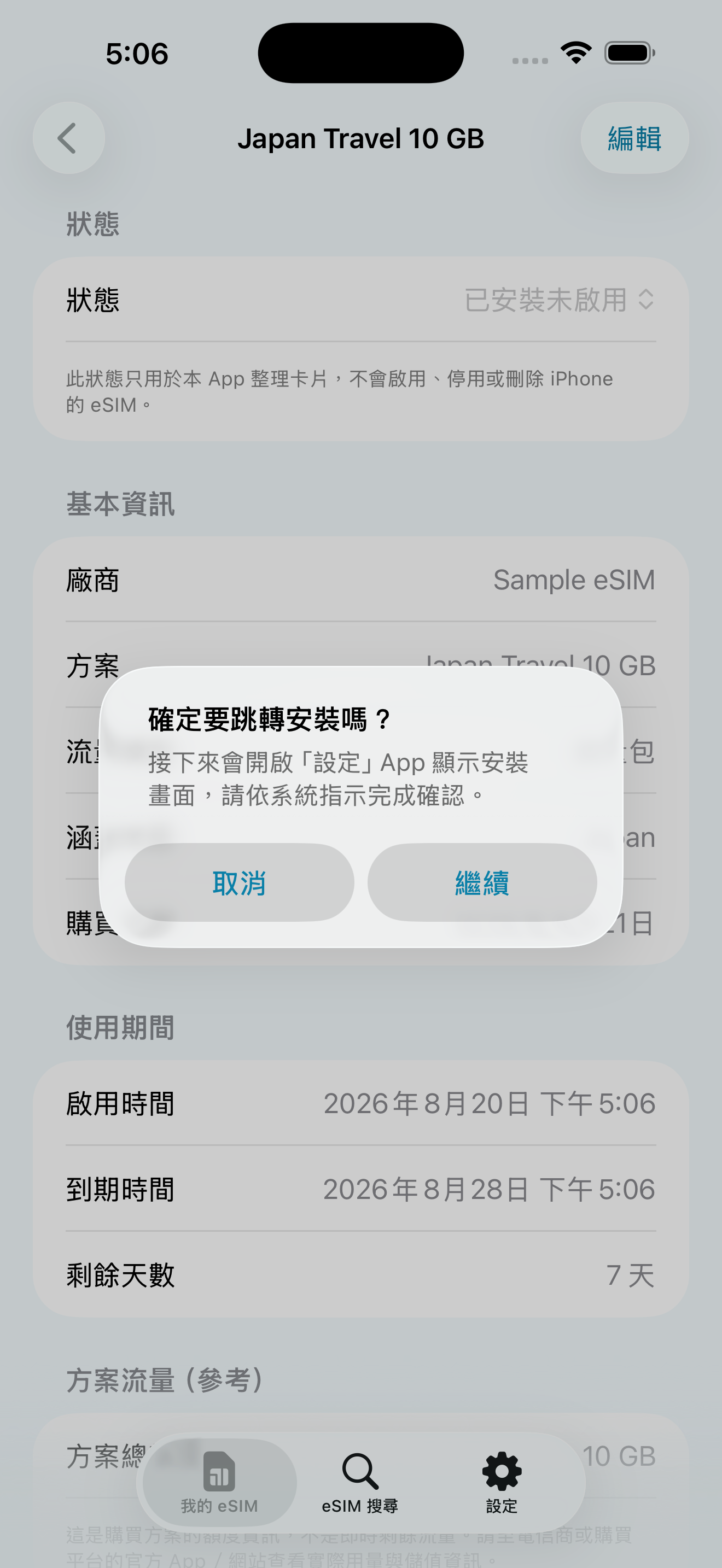
Wenn die Aktivierungsinformationen vollständig sind und das Gerät unterstützt wird, können Sie versuchen, den Apple-Systemprozess zur eSIM-Installation zu öffnen. Die Bestätigung erfolgt weiterhin manuell auf dem iOS-Systembildschirm; das Ergebnis hängt von iOS, Gerät, Netzwerk und Anbieter ab.
  • Installation flow guide: Click the button to display the iOS eSIM installation screen.
  • Confirm manually: The app can't silently install, enable, or change your iPhone's mobile settings.
  • Conditions of use: Requires iOS 17.5+, eSIM-enabled iPhone, active information, and internet connection.
系統安裝與Confirm manually引導

Primary card protection to avoid misuse of roaming data

Make sure your primary card's “Data Roaming” and “Allow Mobile Data Switching” are turned off before you leave the country, reducing the risk of high roaming charges.

  • Master Card Data Roaming: Confirm deactivation in Settings > Mobile Services > Master Card.
  • Mobile data toggle: Confirm to turn off in Settings > Mobile Services > Mobile Data.
  • Will not change automatically: The app only provides onboarding and confirmation, and the setup is still done by the user on the iPhone.
Primary Card Protection設定引導

Choose a language you're familiar with in the app

You can switch the language of the app interface directly during your trip, or choose to follow the language of the iPhone system.
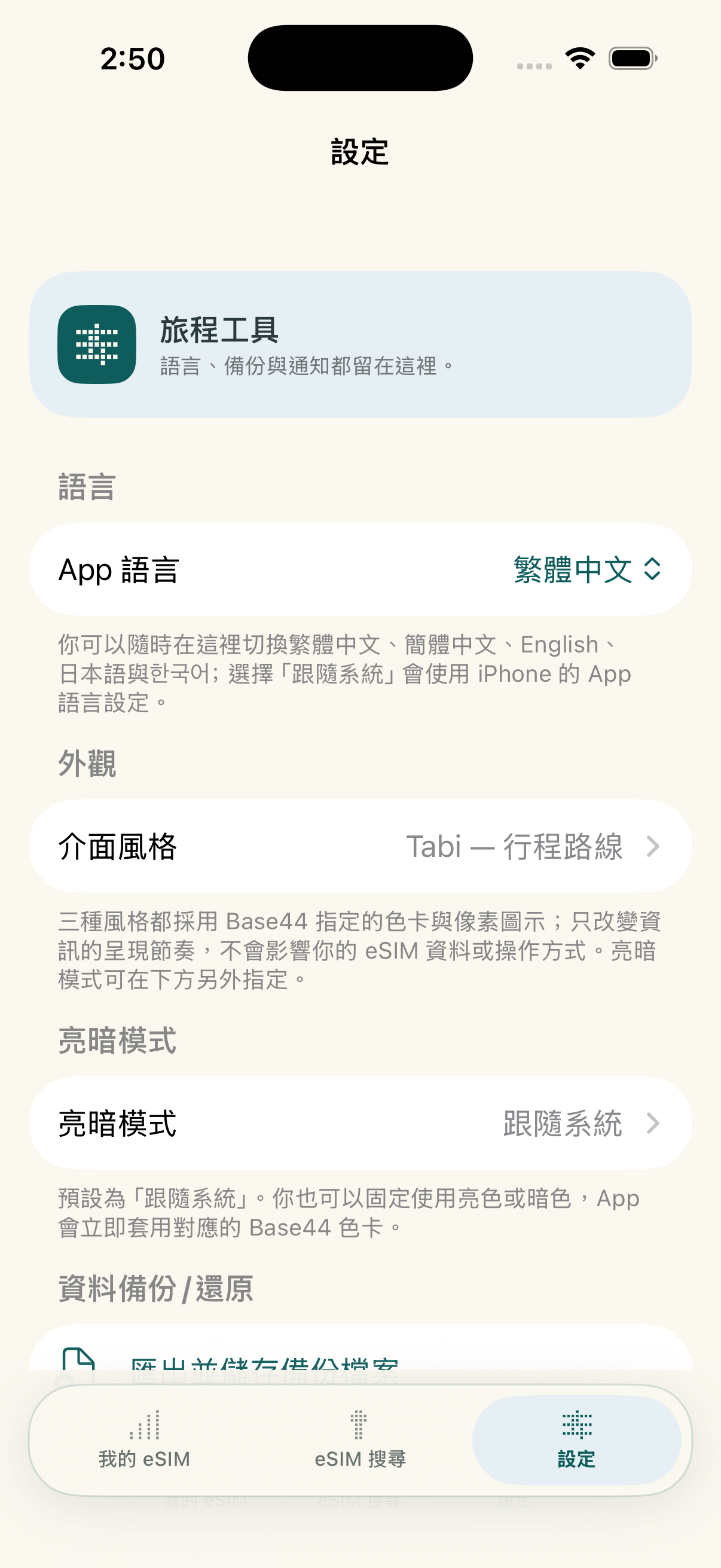
  • Traditional Chinese/Simplified Chinese: Supports frequently used interfaces for Taiwanese and Chinese-speaking travelers.
  • English/Japanese/: Supports language selection in key travel markets.
  • Follow the system: Displays automatically according to your iPhone's app language settings.
App 外觀與語言設定

Switching Phone Backup and Restore

You can export a JSON backup and import card records on a new device; when you set a password, the backup is encrypted with AES-GCM.
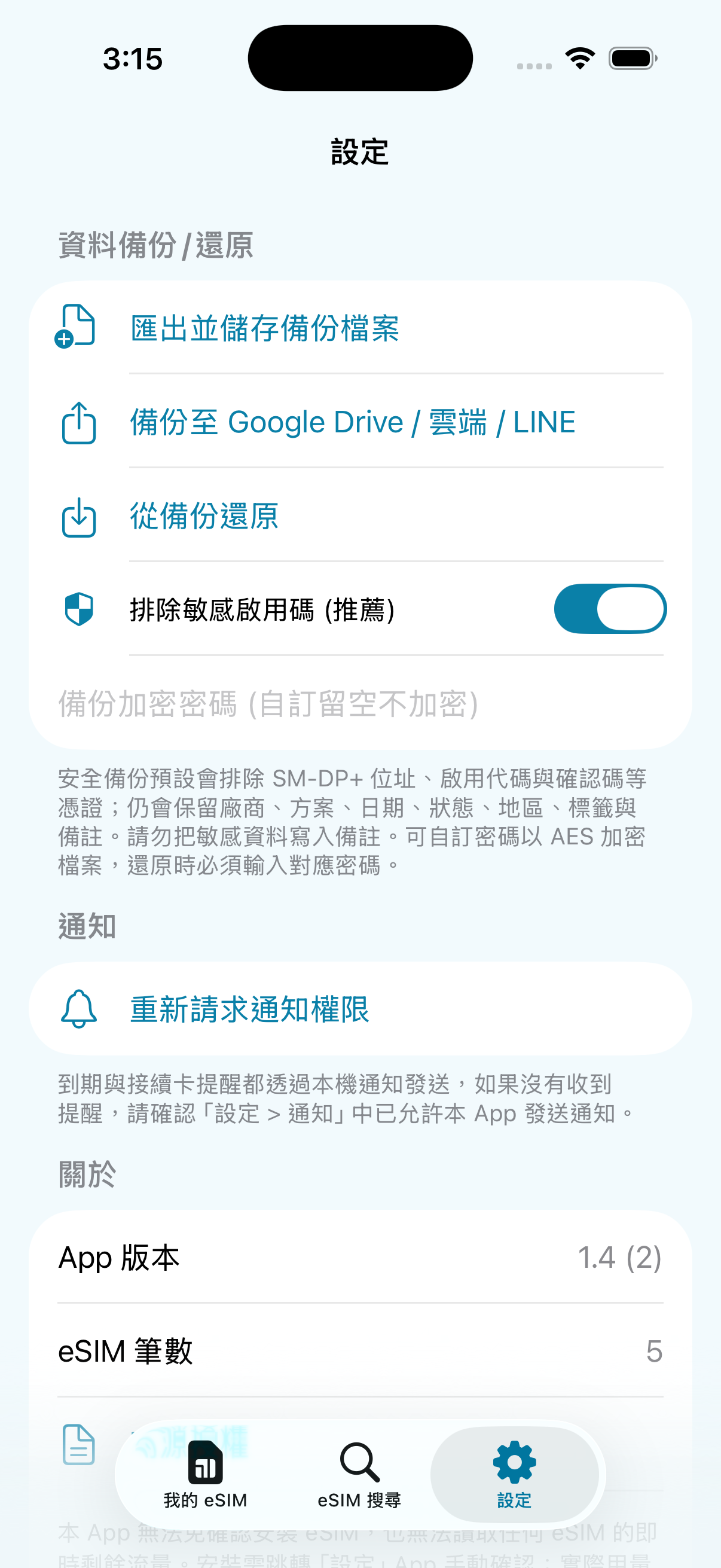
  • 🔐 Optional password encryption: After setting the password, it is encrypted with AES-256-GCM; backups without a password are not encrypted, please keep it properly.
  • 📁 Flexible storage: Can be sent in the File app, iCloud Drive, or AirDrop.
  • Sensitive information exclusion: The activation code is excluded by default; such backups restore the card history but cannot be used directly for system installation.
設定與備份分頁
So funktioniert es

Vom Tarifvergleich bis zum Reiseabschluss

Sechs Schritte führen durch Kauf, Import, Installation, Aktivierung, Nutzungsprüfung und Reiseabschluss. Wische horizontal, um jeden Schritt zu sehen.


女性旅人用 eSIMManager 掃描供應商 QR Code 的插圖
2Scan import after receiving QR codeUse your app camera to add activation info to your card history
eSIMManager 確認開啟 iOS eSIM 安裝流程的實機畫面
3Once confirmed, the iOS installation process will be triggeredSystem installation still needs to be done manually on the iPhone setup screen
女性旅人抵達目的地後準備啟用旅遊 eSIM 的插圖
4When you arrive, follow the instructions to activateConfigure data roaming or enable services based on plan rules
女性旅人旅行中查看行動流量估算的插圖
5See traffic estimates while travelingOpen the card if in doubt to check the progress of the local estimation
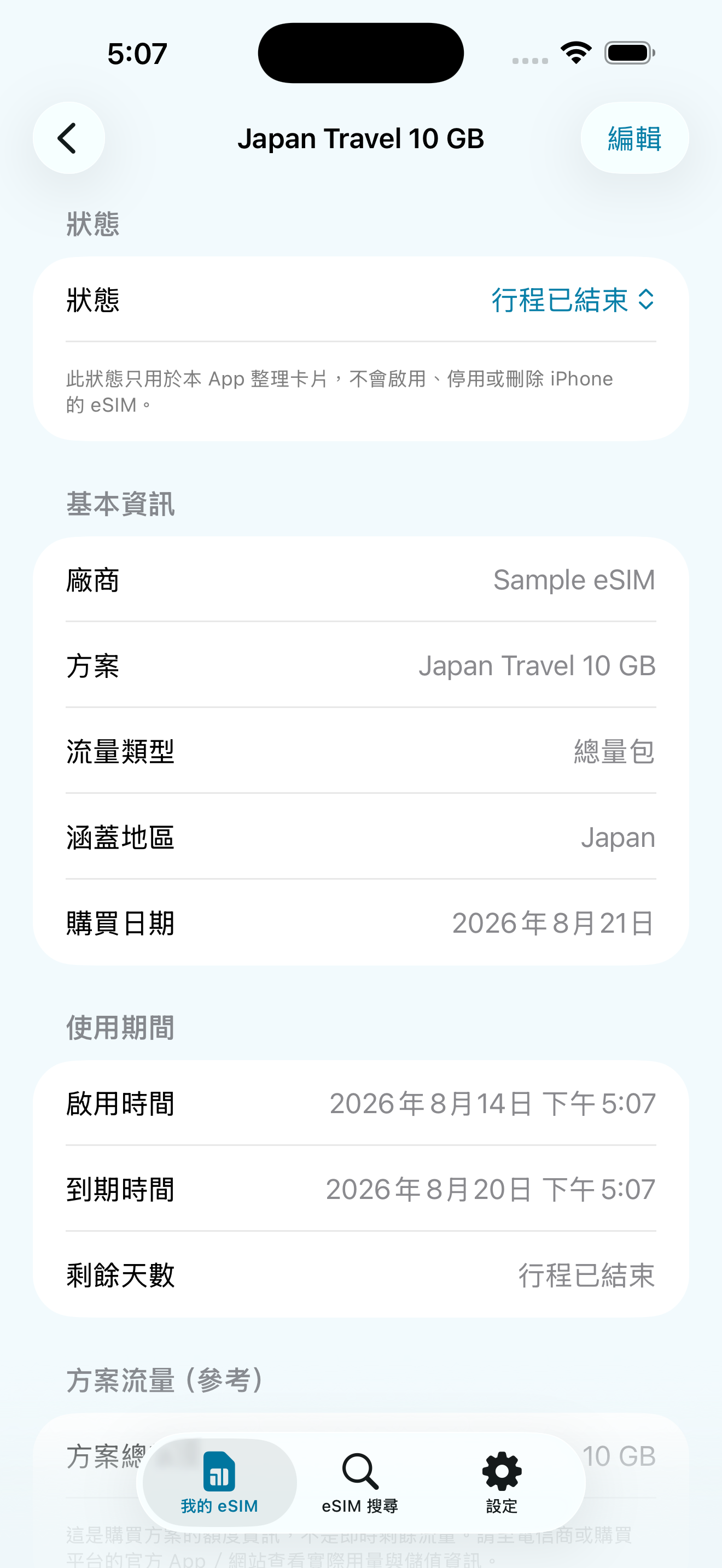
eSIMManager 顯示行程已結束的實機畫面
6Trip ended, indicating that the trip has endedKeep records for future reference and organization
  1. Pre-Departure: Installation and Master Card Protection CompleteConfirm that the travel eSIM is installed and selected as mobile data, and close the main card "Data roaming" and "Allow mobile data switching".
  2. Upon arrival: Enabled by supplier rulesSome programs must be activated upon arrival, or data roaming for travel eSIM must be turned on.
  3. On trip: Confirm connection to start local estimationTraffic figures are device-side estimates, not real-time carrier balances.
Important: eSIMManager does not make changes to the iPhone's mobile data lines, roaming settings, or carrier account balances; each step is confirmed by the user according to the instructions of the iPhone and the supplier.
eSIMManager Vor der Abreise精靈實機畫面
Real-world app screens: pre-departure, post-arrival, and on-trip confirmations.
Acht Sprachen

You can switch between Traditional Chinese, Simplified Chinese, English, Japanese, Japanese, or choose to follow the iPhone system language in the app.
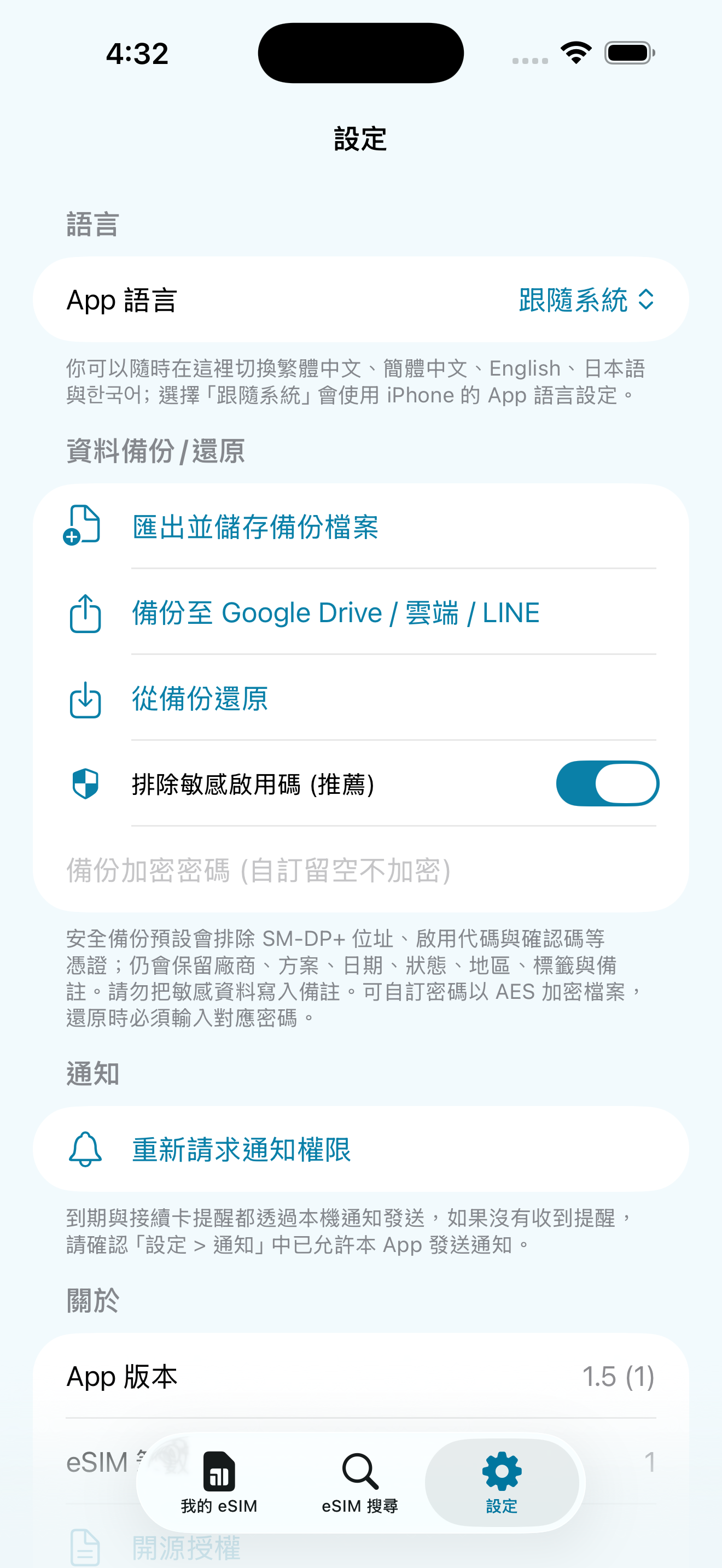
eSIMManager App 語言設定畫面
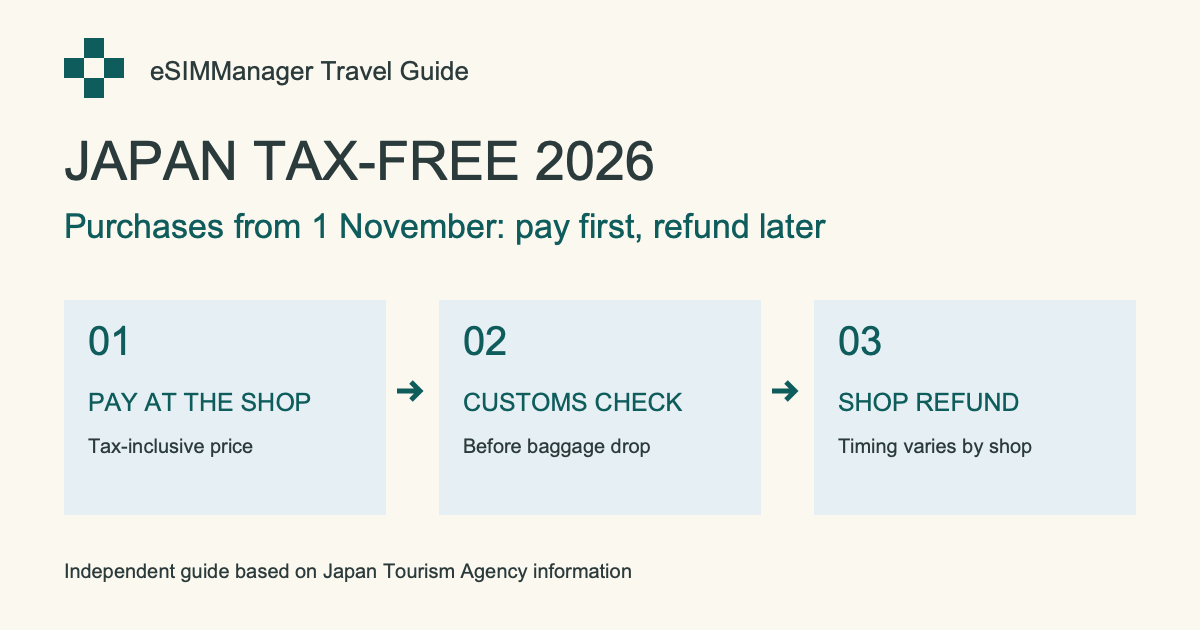
Reisewissen für Japan · 2026/11/01

Tax-free-Shopping in Japan: Änderungen ab November 2026

Kaufdatum, Zollkontrolle, Gepäckaufgabe und Erstattung – ein Leitfaden auf Basis offizieller Quellen.

Leitfaden auf Englisch lesen →

eSIM / Reisedatenkarte kaufen

Du wählst den Tarif, wir helfen beim Organisieren

Besorgen Sie zuerst den QR-Code oder die LPA-Aktivierungsdaten und verwenden Sie anschließend eSIMManager, um die Informationen zu organisieren und die Einstellungen Schritt für Schritt zu prüfen. Die folgenden Links führen zu externen Shops und Plattformen wie Klook, KKday, Airalo und Trip.com; tatsächliche Tarife, Preise, Verfügbarkeit und Aktivierungsregeln richten sich nach der jeweiligen Plattform.

Empfohlene eSIM-Kaufoption Shopee shrimp skin shopping

Flying Show Shop

Browse eSIM and travel card plans; confirm your destination, days of use, how to activate, and item descriptions before placing your order.

GO TO store

The above are the official advertisements or referral links provided by external stores and platforms; some of the links may contain referral/profit sharing parameters. The actual price, promotion and service content are subject to the pages of each platform. After clicking, you will leave the eSIMManager website, and the transactions, goods and services are provided by each store or platform in accordance with its terms.

Technische Transparenz und Grenzen

In order to protect the user's right to know and to align the system with how it really works, we would like to explain the technical rationale and limitations of this app:

"Traffic is device-side estimation" Technical Instructions

The mobile traffic statistics of this app are collected through the Darwin BSD underlying getifaddrs interface, reading local pdp_ip* The cumulative number of transceiver bytes in the mobile data channel. This isDevice-side network traffic estimation reference: Unable to identify which eSIM is actually being used, traffic from other SIMs, interface resets, data waiver offers, and billing cycles can all cause discrepancies. Estimates are updated when the app returns to the outlook, not the carrier's live bill; actual remaining balance is subject to the carrier's official system.

iOS System Installation Process and Permission Regulations

Aus Sicherheitsgründen erlaubt iOS Drittanbieter-Apps nicht, eine eSIM still im Hintergrund zu installieren oder die mobile Datenleitung zu ändern. „Installation starten“ versucht nur, den Apple-Systemprozess zu öffnen; ob er erscheint und abgeschlossen werden kann, hängt von iOS-Version, Gerät, Netzwerk, Aktivierungsdaten und Anbieter ab. Die Bestätigung muss weiterhin manuell erfolgen.

Partnerschaften

Working together to create a better travel network card ecosystem

eSIMManager focuses on providing pure, high-quality local management tools. We welcomeCarriers, eSIM publishers, travel platforms, and partnersNegotiate appropriate leads, brand exposure, and content collaboration.

Carriers and network card issuers

Negotiate ways to collaborate on standard LPA QR Code compatibility information, brand exposure, and exclusive offers.

Travel & Platform Partners

Travel platform leads, co-branding campaigns, and diverse business project proposals.

Business Cooperation Inquiries

Fill out the form below or send it directly to the official mailbox and we'll get back to you as soon as we can.

Asked Questions

Have questions about using? Take a look here

No. eSIMManager is a management and configuration facilitator that does not issue eSIM and does not restrict which vendor you buy from. As long as the supplier provides valid QR code or LPA activation information, you can organize, install, and configure according to the app and the supplier's instructions. External referral links on the website may include revenue parameters, but transactions, prices, inventory and after-sales service are provided by the supplier.
Aufgrund der Sicherheitsbeschränkungen von iOS kann keine Drittanbieter-App eine eSIM direkt im Hintergrund installieren. Der Button versucht nur, den Apple-Systemprozess zu öffnen; bitte bestätigen Sie manuell auf dem iOS-Bildschirm. Wenn der Prozess nicht erscheint oder fehlschlägt, prüfen Sie iOS 17.5+, Netzwerk, gültige Aktivierungsdaten und Anbieterunterstützung oder verwenden Sie den QR-Code bzw. die offizielle App des Anbieters.
Please ensure that the QR code or document contains valid LPA activation information (common content is LPA:1$ Beginning). Image quality, supplier format, or protected PDF may affect identification; use Manual Input instead to paste the complete LPA string provided by the supplier, or request a standard certificate from the supplier.
Normal. This function counts the throughput of the iPhone's mobile data interface, and it is not possible to identify which eSIM is actually used; the amount of other SIMs, interface resets, traffic-free offers, and different billing cycles may cause a gap. Estimates are only updated when the app returns to the outlook and are for travel reference only; the exact balance is subject to the carrier's official system.
Cards are not automatically uploaded to the cloud in this app. JSON can be exported before switching over to Configure ➔ Data Backup; passwords are encrypted. The default backup excludes the activation code, so you can restore the card history, but it may not be possible to reinstall eSIM directly; choose whether to include sensitive information and save the file properly if necessary.

Choose your plan and travel with peace of mind

Download eSIMManager for free today and organize every travel eSIM into a clear, secure departure flow.
Weitere Apps von uns
Card Master · 人脈大師

Card Master · 人脈大師

Reisen organisieren. Wichtige Kontakte griffbereit behalten.

Verwandle Visitenkarten aus Papier in durchsuchbare, bearbeitbare Kontaktdaten. Scanne Karten, ordne sie in Gruppen und schütze private Karten.

  • Visitenkarten scannen
  • Gruppen und Suche
  • Private Karten und verschlüsselte Backups

iPhone · Oberfläche auf traditionellem Chinesisch · Im taiwanischen App Store verfügbar. Kostenloser Download mit Werbung und In-App-Käufen. Ein einmaliger Kauf entfernt Werbung dauerhaft und schaltet Geschäftsfunktionen frei. Erkannte Angaben bitte mit der Originalkarte abgleichen.
Im App Store ansehen ↗